
SecureCRT
SecureCRT 한국 판매처입니다.
크라이스아이앤씨는 SecureCRT 한국 공인 리셀러로서 국내 기업, 학교, 연구기관 및 개인 고객을 대상으로 SecureCRT (시큐어씨알티)라이선스를 공급하고 있습니다. SecureCRT 라이선스 종류와 가격, 구매 방법에 대한 문의 및 견적 상담이 가능합니다. 다양한 소프트웨어 제품은 소프트웨어 제품 목록에서 확인하실 수 있습니다.
가격 및 구매 안내
| 제품명 | 가격(VAT포함) |
|---|---|
| SecureCRT(1년 Maintenance 포함): | 161,700원 |
| SecureCRT(3년 Maintenance 포함):: | 267,300원 |
SecureCRT는 Windows, macOS 및 Linux용 상용 터미널 에뮬레이터이자 원격 접속 클라이언트입니다. 이 프로그램은 네트워크 관리자와 IT 전문가에게 안전한 암호화 통신, 고급 세션 관리 및 작업 자동화 기능을 제공합니다.
|
Windows, Mac, Linux용 SecureCRT 클라이언트는 IT 전문가에게 탁월한 안정성의 터미널 에뮬레이션 기능을 제공합니다. 이 프로그램은 고급 세션 관리 기능과 더불어 시간 절약 및 반복 작업 효율화를 위한 다양한 기능을 통해 업무 생산성을 크게 높여줍니다. SecureCRT는 조직 내 모든 사용자에게 안전한 원격 접속, 파일 전송 및 데이터 터널링 기능을 제공합니다. Telnet이나 기존 터미널 프로그램을 대체하려 하거나 더 강력한 기능을 갖춘 보안 원격 접속 도구가 필요하다면, SecureCRT는 하루 종일 활용하게 될 필수적인 애플리케이션이 될 것입니다. 강력한 SSH 보안, 포괄적인 세션 관리, 그리고 고급 스크립팅 기능을 갖춘 SecureCRT는 귀하의 업무 생산성을 극대화하는 데 기여할 것입니다. |


Key Benefits
Securely access business applications on UNIX, Linux, or VMS from machines running Windows, Linux, and macOS — employ the rich emulation support for VT100/102/220, TN3270, ANSI, SCO ANSI, Wyse 50/60, Xterm, and Linux console.
Configure, manage, and organize all your sessions with full control over scrollback, key mappings, colors, fonts, and more — whether you have one or thousands of sessions.
Access your full array of network devices from one client with SSH (SSH2, SSH1), Telnet, Telnet/TLS, serial, RDP (Windows only), and other protocols.
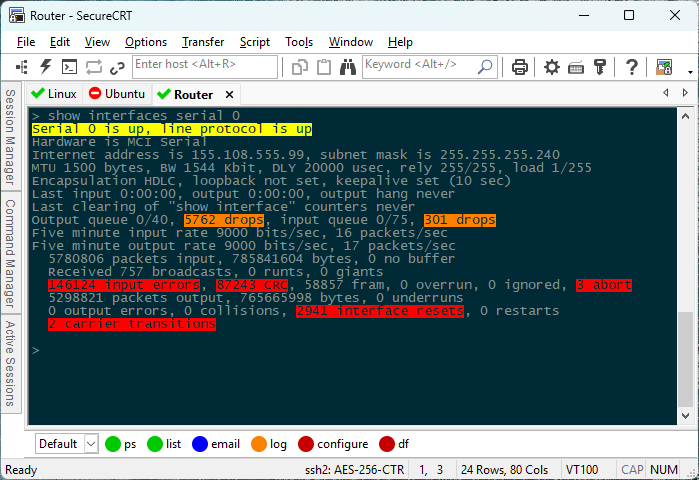
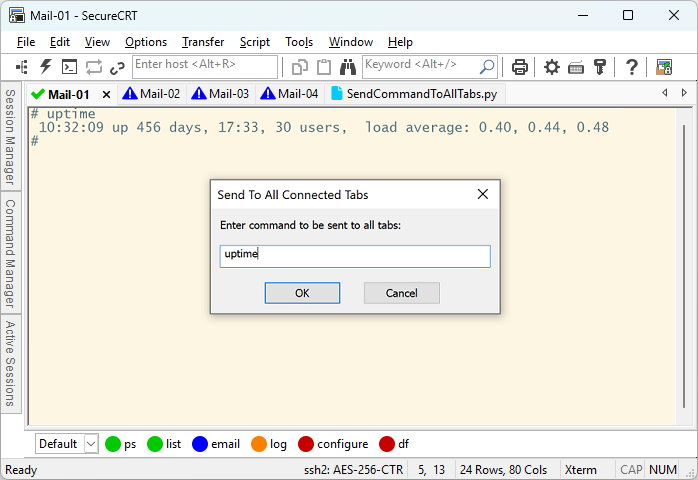
Leverage the high-productivity GUI with time-saving capabilities including tabbed sessions, tab groups, snapshots (saved workspaces), cloned sessions, a button bar and Command Manager for repeated commands, and mapped keys.
Depend on the open standard Secure Shell (SSH) protocol for encrypted logon and session data, flexible authentication options, and optional FIPS 140-2 -approved ciphers.
Automate repetitive tasks in SecureCRT by running scripts using VBScript, JScript, PerlScript, or Python. The script recorder builds your keystrokes into a VBScript or Python script.
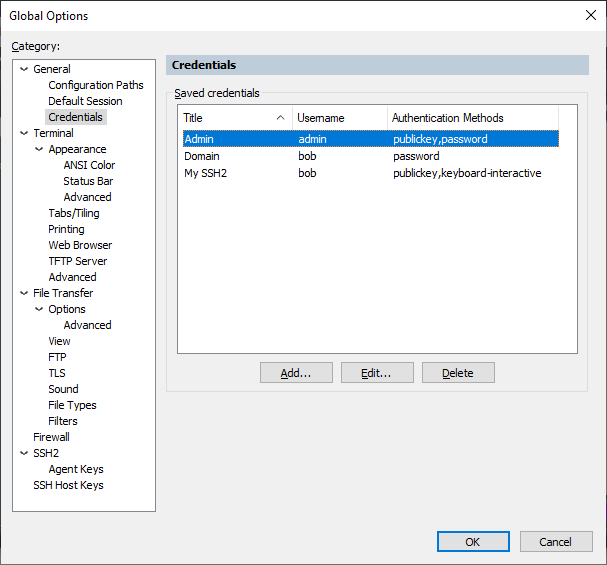
Implement smart cards for highly secure, two-factor authentication. SecureCRT supports X.509 smart cards (PIV/CAC) with the ability to select a specific certificate to be used for public-key authentication.
Transfer files between network devices with SFTP, Xmodem, Ymodem, Zmodem, or Kermit. A built-in TFTP server provides additional file transfer flexibility.
Save steps with the close integration of SecureCRT and the SecureFX® file transfer client, which share sessions and settings that let you run SFTP, FTPS (FTP/TLS), HTTPS (WebDAV and Amazon S3), SCP, FTP, and HTTP file transfer sessions without reentering passwords.
System Requirement
| WindowsWindows Server 2025Windows 11Windows Server 2022Windows Server 2019Windows Server 2016Windows 10 | macOSmacOS® 26 (Tahoe)macOS 15 (Sequoia) | LinuxUbuntu®/Kubuntu® 24.04 LTS 64-bitUbuntu/Kubuntu 22.04 LTS 64-bit |
SecureCRT FAQ
Will my SecureCRT license keys work on the macOS and Linux versions?
SecureCRT licenses are not currently platform-specific, but the license usage restrictions set forth in section three (3) of the End User License Agreement still apply:
3. USE AND EVALUATION PERIOD. You may use one copy of this Software on one client computer. For the purposes of this agreement, “computer” means a physical device or a virtual machine. A copy of this Software is considered “in use” when loaded into main memory (i.e., RAM). You may also use a copy of the Software on one additional computer, provided you make certain only one copy of the Software is “in use” at a time. You may use an evaluation copy of the Software for only thirty (30) days in order to determine whether to purchase the Software.
If SecureCRT is only running on one machine at any given time, then a SecureCRT license can legally be used to register SecureCRT on one (1) secondary Windows/Mac/Linux machine.
However, if SecureCRT needs to be running on multiple machines at the same time ever, a separate SecureCRT license must be purchased for each machine (regardless of OS platform).
Note: This usage policy is governed by the current license agreement for SecureCRT and is subject to change in future releases of SecureCRT.
If you need to purchase an additional SecureCRT license to run concurrently on a different machine, go to the Purchase page.
How do I transfer my license to a new machine?
SecureCRT is licensed per computer, not user or server.
As defined in the SecureCRT End User License Agreement (EULA), a computer can be one of the following:
- A client machine running a client operating system like Windows, macOS, or Linux.
- A seat, which is defined as a software or hardware client that has access to use SecureCRT installed on a centralized machine (e.g., a terminal server, jump host, or RDS server).
You will need one SecureCRT license for each computer that has access to use SecureCRT locally or remotely.
If you remove SecureCRT from one computer, you can register SecureCRT on a new computer using the same license that was in use on the old computer.
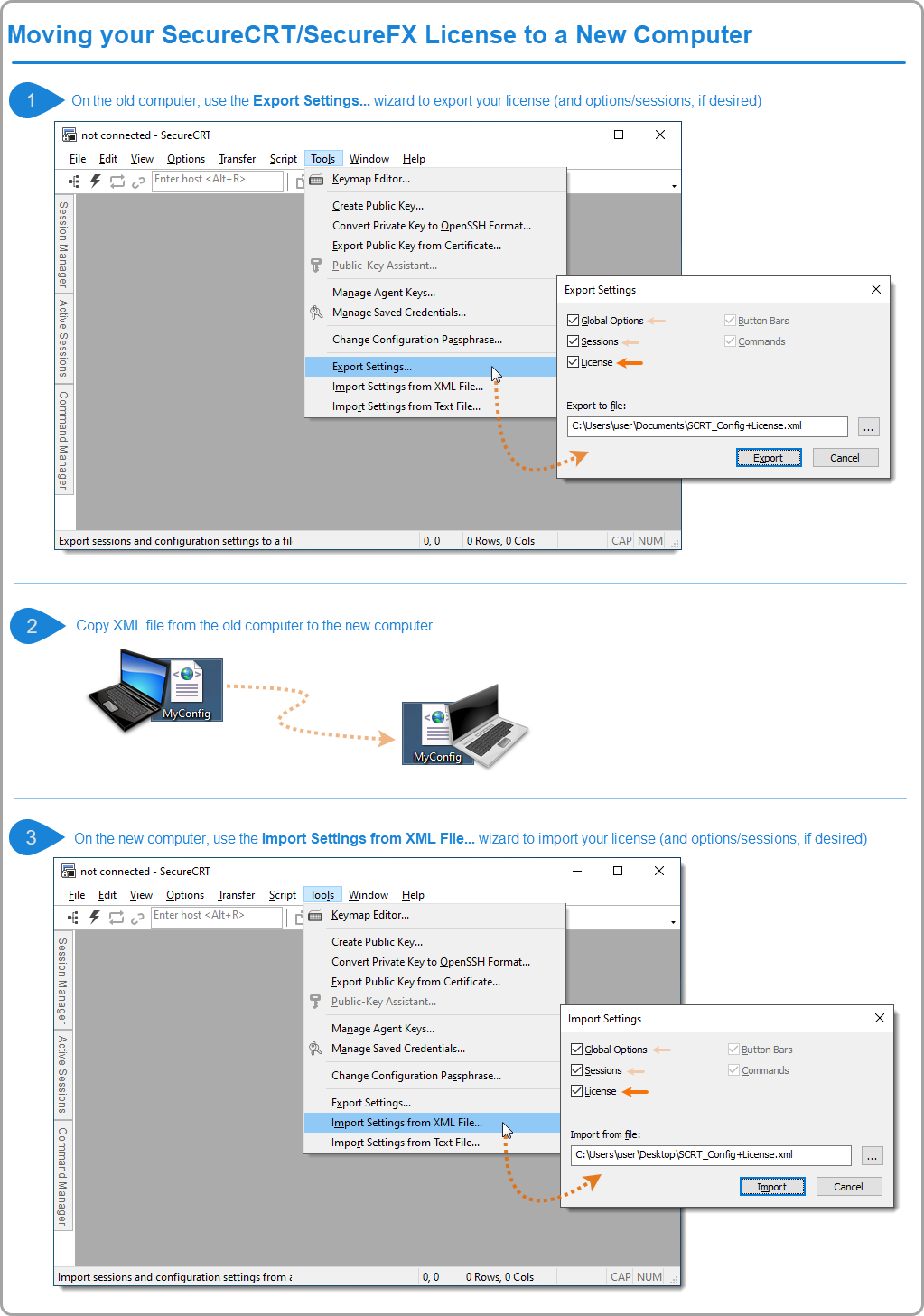
To assist with transferring a SecureCRT license from one computer to another, you may wish to use the import/export wizard as follows (also shown in the graphic below):
-
Launch SecureCRT on the old computer, click on the main Tools drop-down menu and select Export Settings….
When the Export Settings window appears, enable the License option (and Global Options and Sessions, if desired), specify a location and name for the file that will be created, and press the Export button. - Copy the resulting XML file from your old computer to your new computer.
-
Launch SecureCRT on the new computer, click on the main Tools drop-down menu and select Import Settings from XML File….
When the Import Settings window appears, enable the License option (and Global Options and Sessions, if desired), use the Browse button to navigate to the XML file you copied to your machine, and press the Import button.
[SecureCRT 견적 요청]
SecureCRT 한국 판매처 및
공인 리셀러
주식회사 크라이스아이앤씨는 2003년에 설립되어 VanDyke Software, Inc.사의 SecureCRT 시큐어시알티 제품을 2003년도부터 판매해오고 있으며, 한국 공인 총판 입니다.
크라이스아이앤씨 는 국내 대표적인 IT 소프트웨어공급사로 한국 국내에 기업,학교,연구기관 및 공공기관등 여러 각종 전문분야에 종사하시는 분들에게 맞는 제품을 공급해드리고 있으며, 구매하신 소프트웨어제품의 업데이트와 필요시 업그레이드 지원을 하고 있습니다.
고객들이 해외소프트웨어구매시 어려움이 없게 크라이스아이앤씨 자체쇼핑몰 kreissoft.co.kr 를 운영해오고 있으며 또한 설계,디자인,영상,음악등 엔터테인먼트 분야에 특화된 쇼핑몰 Dez.co.kr 도 같이 운영하고 있습니다.
일반 고객들도 쉽고 편하게 이용할수 있도록 네이버 스마트스토어에 2018년도부터 입점하여 당사가 취급하는 전제품을 올려놓았으며 그동안 고객지원에 힘쓴결과 2022년 네이버파트너 인증을 받았습니다.
