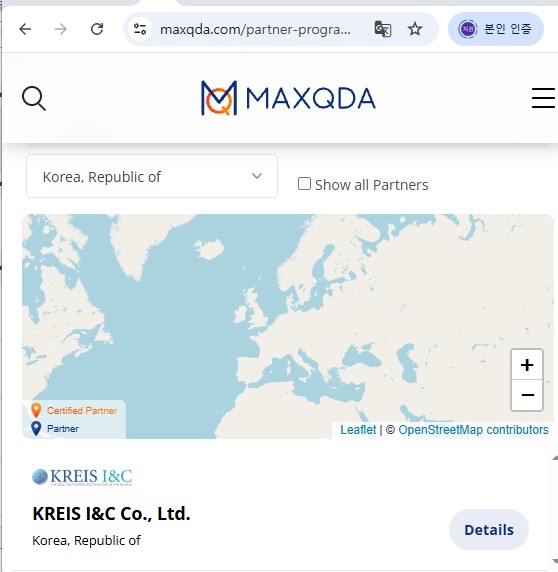
MAXQDA 한국 판매처입니다.
크라이스아이앤씨는 MAXQDA 한국 공인 리셀러로서 국내 기업, 학교, 연구기관 및 개인 고객을 대상으로 MAXQDA 라이선스를 공급하고 있습니다. MAXQDA라이선스 종류와 가격, 구매 방법에 대한 문의 및 견적 상담이 가능합니다. 다양한 소프트웨어 제품은 소프트웨어 제품 목록에서 확인하실 수 있습니다.
가격 및 구매 안내
| 제품명 | 가격(VAT포함) |
|---|---|
| MAXQDA26 (1년 사용권) | 1,133,000원 |
| MAXQDA26 Analytics Pro (1년 사용권) | 1,359,600원 |
| 교육용 MAXQDA26 (1년 사용권) | 498,300원 |
| 교육용 MAXQDA26 Analytics Pro (1년 사용권) | 566,500원 |
MAXQDA
- Qualitative and Mixed Methods Data Analysis
- Quantitative Text Analysis with “MAXDictio”
MAXQDA Analytics Pro
- Qualitative and Mixed Methods Data Analysis
- Quantitative Text Analysis with “MAXDictio”
- Statistical Data Analysis with “Stats”
MAXQDA Products: Detailed Feature Comparison
You can select from two different MAXQDA products. Compare their specific features and find the MAXQDA that works best for you.
The #1 qualitative data analysis software with the best AI integration
Organize. Analyze. Visualize. Present.
Literature Review
Mixed Methods
Your benefits with MAXQDA
Intuitive and easy to learn
직관적인 인터페이스 덕분에 빠르게 사용법을 익히실 수 있습니다. 다양한 튜토리얼, 가이드, 웨비나와 활발한 커뮤니티는 MAXQDA를 더욱 깊이 있게 활용하는 데 도움을 줍니다.
Identical on Windows and macOS
하나의 라이선스로 두 가지 운영체제에서 사용할 수 있습니다. 동일한 인터페이스와 기능을 갖추고 있어 MAXQDA를 활용한 협업과 교육이 간편합니다. 작업 환경을 유연하게 선택해 보세요.
Best AI integration with excellent data protection
MAXQDA AI Assist와 MAXQDA Tailwind를 통해 첨단 AI 기반 기능을 활용할 수 있습니다. 최고 수준의 데이터 보호 및 분석 작업에 대한 통제권을 유지하면서 연구의 수준을 한 단계 높여보세요.
Developed by researchers for researchers and all data enthusiasts
MAXQDA의 모든 기능은 사용자에게 제공되기 전, 특정 목적에 맞춰 개발 및 테스트를 거쳐 최첨단 연구 워크플로에 적용됩니다.
Constant innovation and regular updates
MAXQDA는 끊임없이 발전하고 있습니다. 2~3개월마다 새로운 도구를 추가하고 기능을 개선한 업데이트를 제공하여, 귀하의 연구가 언제나 한발 앞서 나갈 수 있도록 지원합니다.
Report-ready results with your all-in-one software
탁월한 시각화 기능, 편리한 보고서 생성기, 그리고 분석 결과를 통합할 수 있는 QTT 워크스페이스를 갖춘 MAXQDA는 보고서에 바로 활용할 수 있는 데이터를 신속하게 준비하기 위한 최적의 선택입니다.
Add-ons
MAXQDA Tailwind
MAXQDA AI Assist
MAXQDA Transcription
MAXQDA Teamcloud
System Requirements for MAXQDA
MAXQDA 24.0 or higher – Windows
Operating System: Windows 11, Windows 10 (64 bit)
Processor: 2 cores with 1,6 GHz each. Recommended: 4 or more cores, 2 GHz each. Windows ARM computers or tablet computers with ARM processors are not supported.
RAM: min. 4 GB. Recommended: 8 GB or more
Display: min. 1.280 x 720. Recommended: 1.920 x 1.080 or more
License Activation: Internet connection necessary once for activation
Microsoft Office: The import of .doc or .odt documents require Microsoft Word 2003 or newer and .NET 3.5 or newer. (.NET is automatically installed if missing and might require a system restart).
Additional Comments: If you are working with challenging projects and/or large media files adequate computer hardware is recommended.
MAXQDA 24.0 or higher – Mac
Operating System: macOS 26 (Tahoe), macOS 15 (Sequoia), macOS 14 (Sonoma), macOS 13 (Ventura), macOS 12 (Monterey), macOS 11 (Big Sur), macOS 10.15 (Catalina), macOS 10.14 (Mojave)
Processor: 2 cores with 1,6 GHz each. Recommended: 4 or more cores, 2 GHz each. ARM processors are supported only for Apple desktop and laptop computers. ARM processors in Apple tablet computers are not supported.
RAM: min. 4 GB. Recommended: 8 GB or more
Display: min. 1.280 x 720. Recommended: 1.920 x 1.080 or more
License Activation: Internet connection necessary once for activation
Additional Comments: If you are working with challenging projects and/or large media files adequate computer hardware is recommended.
MAXQDA 24.0 or higher – Network/University
Server PC Requirements
Network and University licenses are set up and managed with the MAXQDA Netlic Service and MAXQDA Netlic Manager in a Windows environment. The MAXQDA Netlic Manager gives you on demand access to all the information concerning your MAXQDA Netlic License and allows you to easily activate or extend your license(s).
Operating System: Windows Server 2025, 2022, 2019, 2016, 2012 R2, 2012, Windows 11 (64 bit), Windows 10 (64 bit), 8.1 (64 bit), 8 (64 bit)
RAM: min. 2 GB.
Environment: Network licenses must be installed in a client-server environment.
Client Computer Requirements
Users can access a MAXQDA network license with both Windows and Mac computers. When MAXQDA is started, the client PC logs on to the MAXQDA Netlic Service and occupies a “Seat”.
Client computers must be logged on in the same domain as the server.
Client computers need to have a permanent connection to the server in order to use MAXQDA.
The system requirements for client PCs are the same as for “MAXQDA 24” (top left).
[MAXQDA 견적 요청]
MAXQDA 한국 판매처 및
공인 리셀러
주식회사 크라이스아이앤씨는 2003년에 설립되어 VERBI Software사의 MAXQDA제품을 2016년도부터 판매해오고 있으며, 한국 공인 리셀러 입니다.
크라이스아이앤씨 는 국내 대표적인 IT 소프트웨어공급사로 한국 국내에 기업,학교,연구기관 및 공공기관등 여러 각종 전문분야에 종사하시는 분들에게 맞는 제품을 공급해드리고 있으며, 구매하신 소프트웨어제품의 업데이트와 필요시 업그레이드 지원을 하고 있습니다.
고객들이 해외소프트웨어구매시 어려움이 없게 크라이스아이앤씨 자체쇼핑몰 kreissoft.co.kr 를 운영해오고 있으며 또한 설계,디자인,영상,음악등 엔터테인먼트 분야에 특화된 쇼핑몰 Dez.co.kr 도 같이 운영하고 있습니다.
일반 고객들도 쉽고 편하게 이용할수 있도록 네이버 스마트스토어에 2018년도부터 입점하여 당사가 취급하는 전제품을 올려놓았으며 그동안 고객지원에 힘쓴결과 2022년 네이버파트너 인증을 받았습니다.