

GraphPad Prism 한국 판매처입니다.
크라이스아이앤씨는 GraphPad Prism 한국 리셀러로서 국내 기업, 학교, 연구기관 및 개인 고객을 대상으로 GraphPad Prism라이선스를 공급하고 있습니다. GraphPad Prism 라이선스 종류와 가격, 구매 방법에 대한 문의 및 견적 상담이 가능합니다. 다양한 소프트웨어 제품은 소프트웨어 제품 목록에서 확인하실 수 있습니다.
가격 및 구매 안내
| 제품명 | 가격(VAT포함) |
|---|---|
| GraphPad Prim v11 Corporate 영구 라이선스: | 6,347,000원 |
| 교육용 GraphPad Prim v11 영구 라이선스: | 3,179,000원 |
과학 연구를 위해 특별히 설계된 최적의 분석 및 그래프 작성 솔루션입니다. 전 세계 유수의 과학자들과 함께 Prism을 활용하여 시간을 절약하고, 보다 적절한 분석 방법을 선택하며, 과학 연구 결과를 세련된 그래프로 시각화하고 발표하는 방법을 확인해 보십시오.
Comprehensive Analysis and Powerful Statistics, Simplified
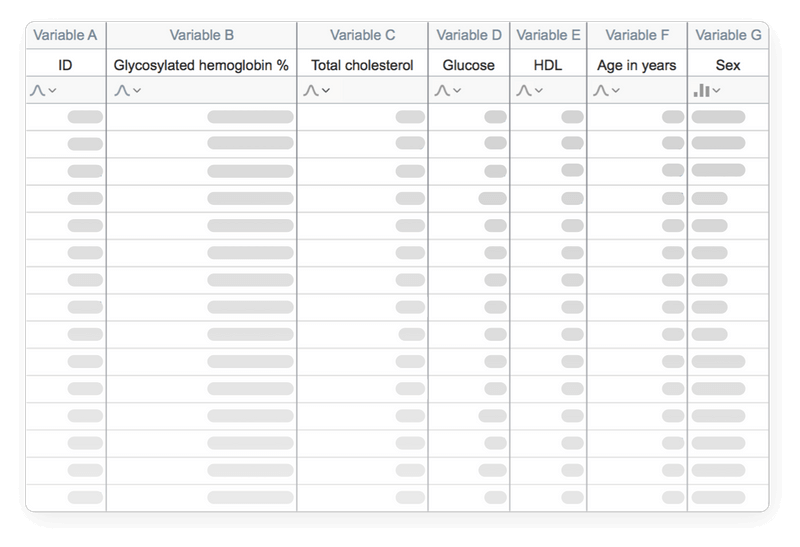
Organize Your Data Effectively
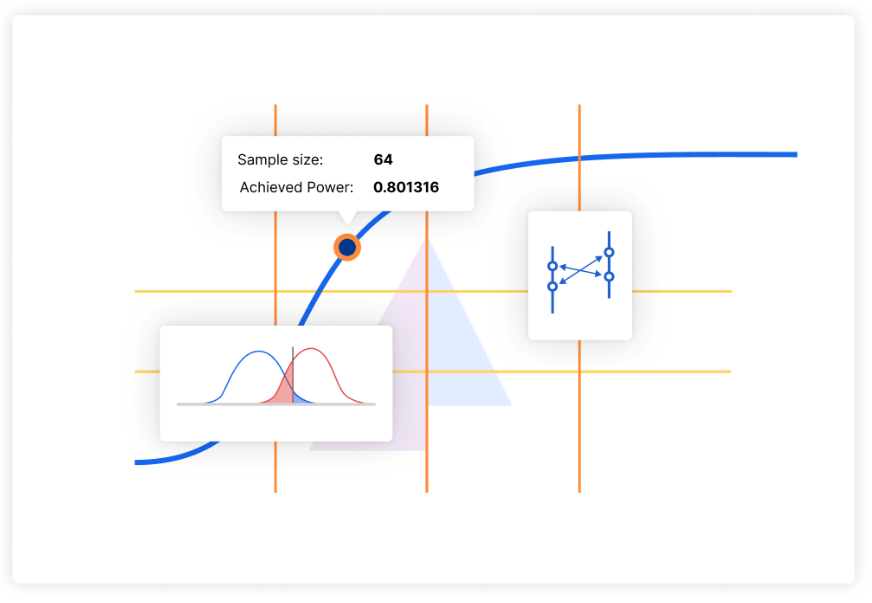
Sample Size and Power Analysis
연구 과정을 효율화하고 소중한 자원을 절약하며, 연구 결과의 신뢰성을 높이십시오.
Perform The Right Analysis
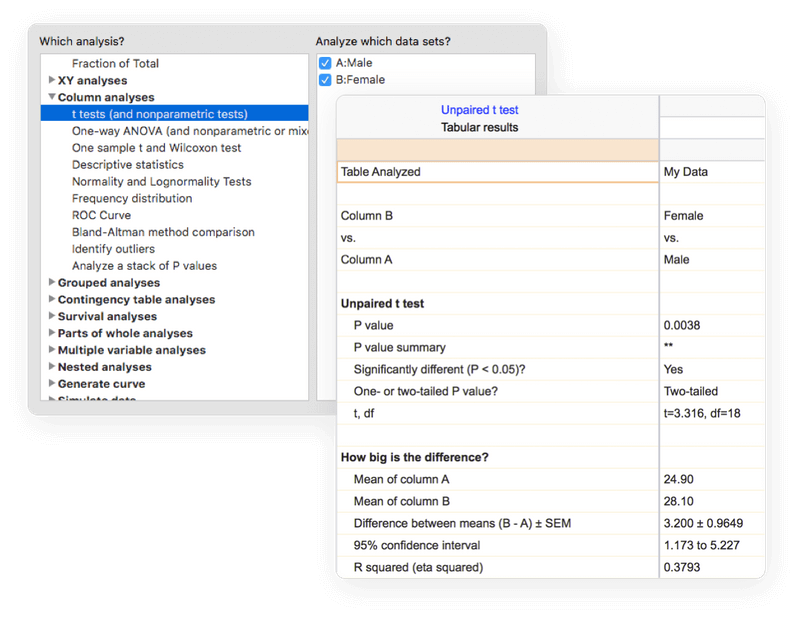
복잡한 통계 전문 용어는 피하세요. Prism은 이해하기 쉬운 언어로 일반적인 분석부터 매우 특수한 분석에 이르기까지 광범위한 분석 기능을 제공합니다. 여기에는 t-검정, 일원·이원·삼원 및 다원(N-way) 분산분석(ANOVA), 선형 및 비선형 회귀분석(용량-반응 곡선 포함), 이항 로지스틱 회귀분석, 생존 분석, 주성분 분석 등이 포함됩니다.
각 분석에는 필수 통계적 가정을 이해하고 적절한 검정 방법을 선택했는지 확인할 수 있도록 돕는 체크리스트가 포함되어 있습니다. 또한 효과 크기(effect size)를 제공하므로 단순히 통계적 유의성뿐만 아니라 결과의 크기와 실질적인 의미까지 파악할 수 있습니다.
Work Smarter, Not Harder
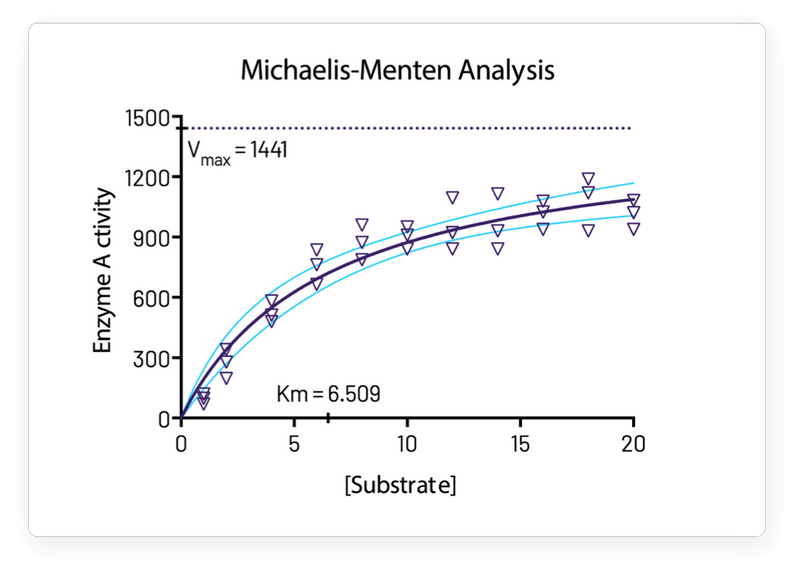
One-Click Regression Analysis
Prism만큼 간편하게 곡선 피팅(curve fitting)을 수행할 수 있는 프로그램은 없습니다. 방정식만 선택하면 Prism이 나머지 모든 작업을 알아서 처리합니다. 즉, 곡선 피팅을 수행하고, 결과 및 함수 매개변수 표를 표시하며, 그래프에 곡선을 그리고, 미지수 값을 보간(interpolate)합니다.
Focus on Your Research, Not Your Software
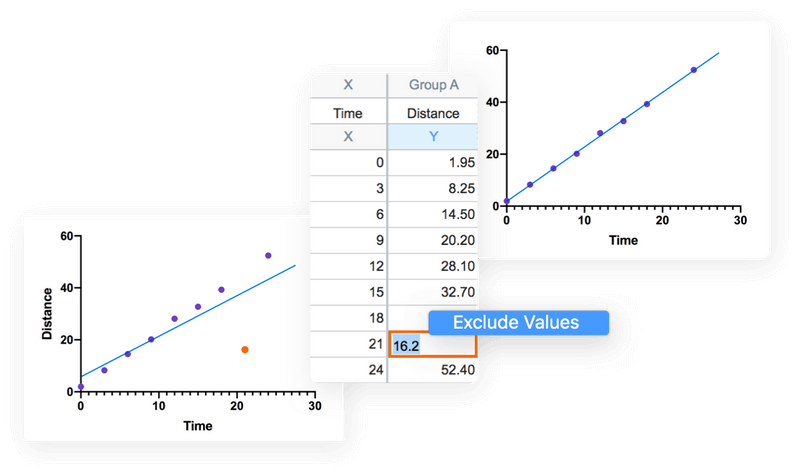
Prism이 코딩 작업을 대신 처리해 줍니다. 그래프와 결과는 실시간으로 자동 업데이트됩니다. 데이터 직접 입력, 오류 데이터 제외, 오타 수정, 분석 설정 변경 등 데이터나 분석 내용에 대한 모든 변경 사항이 결과, 그래프, 레이아웃에 즉시 반영됩니다.
Automate Your Work Without Programming
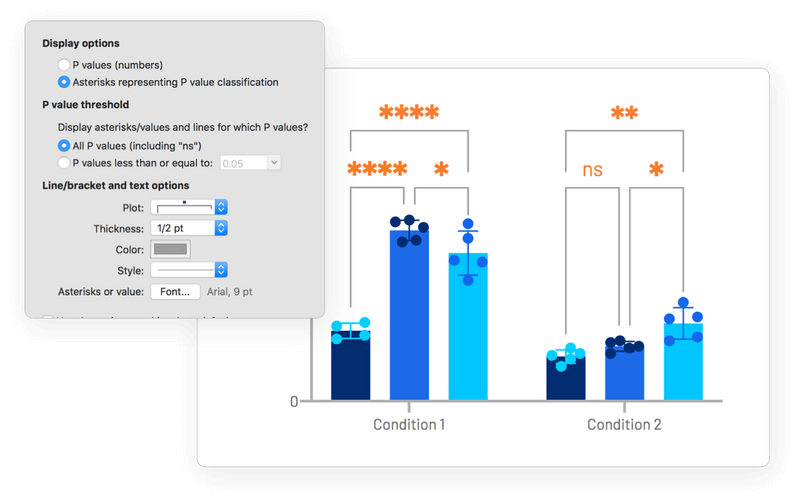
단 한 번의 클릭으로 분석에 다수의 쌍별 비교(pairwise comparisons)를 자동으로 추가할 수 있습니다. 선과 별표(*)의 표시 방식을 변경하려면 도구 모음 버튼을 다시 클릭하기만 하면 됩니다. 데이터나 분석 내용을 수정하면 그래프에 표시된 결과도 자동으로 업데이트됩니다.
Perpetual(영구) License
We do not recommend this option:
X No upgrades
X No guaranteed support for future operating system updates
X No online account management features
X No group management features
X No collaboration capabilities
Subscription
Subscription Plan Comparison
Our Standard and Pro plans are available in student, personal and group variants. Organization and Enterprise plans are only available for groups.
| Legacy Plans | Standard Plan | Pro Plan | Organization Plan | Enterprise Plan | |
Licensing – Basics | |||||
| User Seats | O | O | O | O | |
| Devices per Seat | 1 | 2 | 2 | 2 | 2 |
| Easy Email/Password Activation | O | O | O | O | |
| User Self-Managed Devices in Prism and My Account | O | O | O | O | |
Licensing – Group Management(does not apply to personal licenses) | |||||
| Admin User Management: create and remove users | O | O | O | O | |
| Admin Device Management: view and deactivate devices | O | O | O | O | |
| Seat Reassignment (subject to fair use limits) | O | O | O | O | |
| Advanced Search and Filtering: by email, status and more | O | O | O | O | |
| Excel Seat Export | Limited, machines only | O | O | O | O |
| Shared Device Activations | O | O | O | O | |
| Single Sign On (SSO) | O | O | |||
| Directory Sync (SCIM) | O | O | |||
| Virtual Desktop Support (e.g. VMware, Citrix) | O Add-on | O Add-on | |||
New Statistics, Graphing and Data Management Features | |||||
| Power & Sample Size Analysis* | O | O | O | O | |
| Improved Title Controls for Magic | O | O | O | O | |
| Survival Analysis Multiple Pairwise Comparisons | O | O | O | O | |
| Survival Analysis Automatic Number at Risk Table | O | O | |||
| K-Means Clustering | O | O | |||
| Hierarchical Clustering | O | O | |||
| Dendrograms | O | O | |||
| Confidence Ellipses/Convex Hulls | O | O | |||
| Multiple Variables Classic Analyses | O | O | |||
| Multifactor ANOVA | O | O | |||
| In-Table Formulas | O | O | |||
| Comprehensive Effect Size Reporting | O | O | |||
| Dotmatics Luma Integration | O Add-on | O Add-on | O Add-on | O Add-on | |
Collaboration | |||||
| Prism Cloud Workspace* | O | O | O | O | |
| Project Sharing | O | O | O | O | |
| Collaborative Project Updating | O | O | O | O | |
| Discussions | O | O | O | O | |
| Folders | O | O | O | O | |
| Groups | O | O | O | O | |
| Project Version History | O | O | |||
| Content Manager Role | O | O | |||
| Storage | Standard | Expanded | Standard | Expanded | |
* Some regions excluded / Available with Legacy Personal subscriptions
Frequently Asked Questions
제가 현재 가지고 있는 Legacy (기존) 라이선스는 없어지나요?
제가 Legacy 라이선스를 사용 중인지, New 라이선스를 사용 중인지 어떻게 확인할 수 있나요?
먼저 처음 받은 Prism 활성화 이메일(original Prism activation email)을 확인하거나, 그룹 관리자(Group administrator)에게 받은 안내를 확인해 보세요. 또는 본인이 구독을 구매한 사람이라면 My Account 에 로그인해서 확인할 수 있습니다. 만약 라이선스 활성화에 Serial Number를 사용한다면 (예: GPS-9872345-LAT1-#####), 현재 Legacy Plan을 사용하고 있는 것입니다..
기존 Legacy 라이선스를 가지고도 새로운 구독 플랜에 포함된 특정 기능을 이용할 수 있나요?
system requirements?
Prism’s requirement are not special, and it will run fine on any computer purchased in the last few years. Here are the details:
Prism 11
Windows
- Operating System. Runs under the 64-bit versions of Windows 10 and 11. Prism 11 does not support 32-bit editions of Windows.
- CPU. x64 compatible. Note: Prism Windows is not currently offered in a version compiled to run natively on ARM chipsets (i.e. Qualcomm Snapdragon). However, Prism Windows can run on ARM-powered devices using x64 emulation which is now generally available with Windows 11
- RAM. For comfortable performance and responsiveness, Prism requires the following amount of RAM:
- 2 GB RAM for up to 2 million data cells in currently open Prism files
- 4 GB RAM for 2-8 million data cells
- 8 GB RAM for 8-16 million data cells
- 16 GB RAM for greater than 16 million cells
- Display. The minimum display resolution is 800 x 600, but the recommended display resolution for comfortable work is 1280 x 1024.
- HDD. Requires about 170 MB (megabytes) of space on the hard drive.
- Internet. Prism must connect to the internet to verify the license when it is first activated. It will also attempt to connect upon every launch, and every 24 hours if the application is not closed. To continue operating, this connection must be successful once every 30 days (or 20 attempts, whichever comes sooner).
- Additional Information. Prism requires that the Microsoft Edge WebView2 rendering component be installed to correctly display pages in the Welcome Dialog. This is already installed by Microsoft on most new devices, but will be included with the Prism installation if it is missing.
Mac
- Operating System. Runs under macOS 12 or later.
- CPU. Prism Mac is delivered as a Universal Binary and will run natively on both Apple silicon and Intel-based Mac computers.
- RAM. There is no particular requirement for RAM on Mac. Prism will run fine on all standard configurations of Macs manufactured by Apple.
- Display. Requires a display with a resolution of at least 1024 x 768 pixels.
- HDD. Requires about 530 MB (megabytes) of space on the hard drive.
- Internet. Prism must connect to the internet to verify the license when it is first activated. It will also attempt to connect upon every launch, and every 24 hours if the application is not closed. To continue operating, this connection must be successful once every 30 days (or 20 attempts, whichever comes sooner).
[GraphPad Prism 견적 요청]
GraphPad Prism 한국 판매처
주식회사 크라이스아이앤씨는 2003년에 설립되어 GraphPad 사의 Prism 제품을 2007년도부터 판매해오고 있으며, 한국 판매처 입니다.
크라이스아이앤씨 는 국내 대표적인 IT 소프트웨어공급사로 한국 국내에 기업,학교,연구기관 및 공공기관등 여러 각종 전문분야에 종사하시는 분들에게 맞는 제품을 공급해드리고 있으며, 구매하신 소프트웨어제품의 업데이트와 필요시 업그레이드 지원을 하고 있습니다.
고객들이 해외소프트웨어구매시 어려움이 없게 크라이스아이앤씨 자체쇼핑몰 kreissoft.co.kr 를 운영해오고 있으며 또한 설계,디자인,영상,음악등 엔터테인먼트 분야에 특화된 쇼핑몰 Dez.co.kr 도 같이 운영하고 있습니다.
일반 고객들도 쉽고 편하게 이용할수 있도록 네이버 스마트스토어에 2018년도부터 입점하여 당사가 취급하는 전제품을 올려놓았으며 그동안 고객지원에 힘쓴결과 2022년 네이버파트너 인증을 받았습니다.