
Microsoft® Edge® version 79 and up
Google® Chrome® version 19 and up
Mozilla® Firefox® version 13 and up
Apple® Safari® version 5.1 and up

AutoTURN 한국 판매처입니다.
크라이스아이앤씨는 AutoTURN 한국 공인 리셀러 로서 국내 기업, 학교, 연구기관 및 개인 고객을 대상으로 AutoTURN(오토턴) 라이선스를 공급하고 있습니다. AutoTURN 라이선스 종류와 가격, 구매 방법에 대한 문의 및 견적 상담이 가능합니다. 다양한 소프트웨어 제품은 소프트웨어 제품 목록에서 확인하실 수 있습니다.
가격 및 구매 안내
- AutoTURN(1년 사용권)
- AutoTURN PRO (1년 사용권)
- AutoTURN Online(1년 사용권)
AutoTURN의 차량 회전 궤적 분석으로 설계 프로젝트를 최적화하세요
AutoTURN®은 다양한 유형의 차량이 안전하고 효율적으로 통행할 수 있도록 현장, 교차로, 하역장 및 도로 설계를 간편하게 검토할 수 있는 포괄적인 회전 궤적 분석 소프트웨어입니다.
자전거와 승용차부터 버스, 트럭, 그리고 대형 산업용 운송 차량에 이르기까지, 다양한 주행 경로를 신속하게 시뮬레이션하여 설계의 정확성과 타당성을 확실하게 검증할 수 있습니다. 특허받은 기술을 통해 작업을 자동화함으로써 시간을 절약하고 생산성을 높일 수 있습니다. 또한 향상된 검토, 프레젠테이션 및 보고 기능을 활용하여 프로젝트 승인을 원활하게 이끌어내고 업무의 가치를 높일 수 있습니다.
Features
Analyze Vehicle Movement Path with Our Advanced Vehicle Simulation Software
AutoTURN 소프트웨어 제품군에는 포괄적인 기능을 갖춘 AutoTURN Pro와, 별도의 설치나 CAD 프로그램 없이 웹 브라우저에서 바로 접속해 사용할 수 있는 AutoTURN Online이 포함되어 있습니다. 이들 제품은 교통 프로젝트 수행 시 직면하는 비용 및 성능 관련 과제를 해결할 수 있도록 설계되었습니다, AutoTURN equips engineers to:
- Respond to design changes faster
- Optimize designs with enhanced analysis and visualization
- Spend less time trying out different scenarios for safer designs
Turning Analysis
Simulate Standard & Multi-Part Vehicles Maneuvers
설계의 적합성을 확인해 보십시오. 속도, 편경사(super elevation), 횡방향 마찰력, 회전 반경을 제어하면서 차량을 수동으로 전진 또는 후진 주행시켜 볼 수 있습니다. 이때 트럭과 트레일러처럼 여러 부분으로 구성된 차량이나 지게차와 같이 조향각이 큰 차량을 포함하여 원하는 일반 차량 또는 특수 차량을 선택해 테스트할 수 있습니다. 또한 견인차로 밀어내는 방식(push from prime mover)이나 일반적인 견인 방식(pull method)을 사용하여 사실적인 후진 기동을 구현할 수 있습니다.
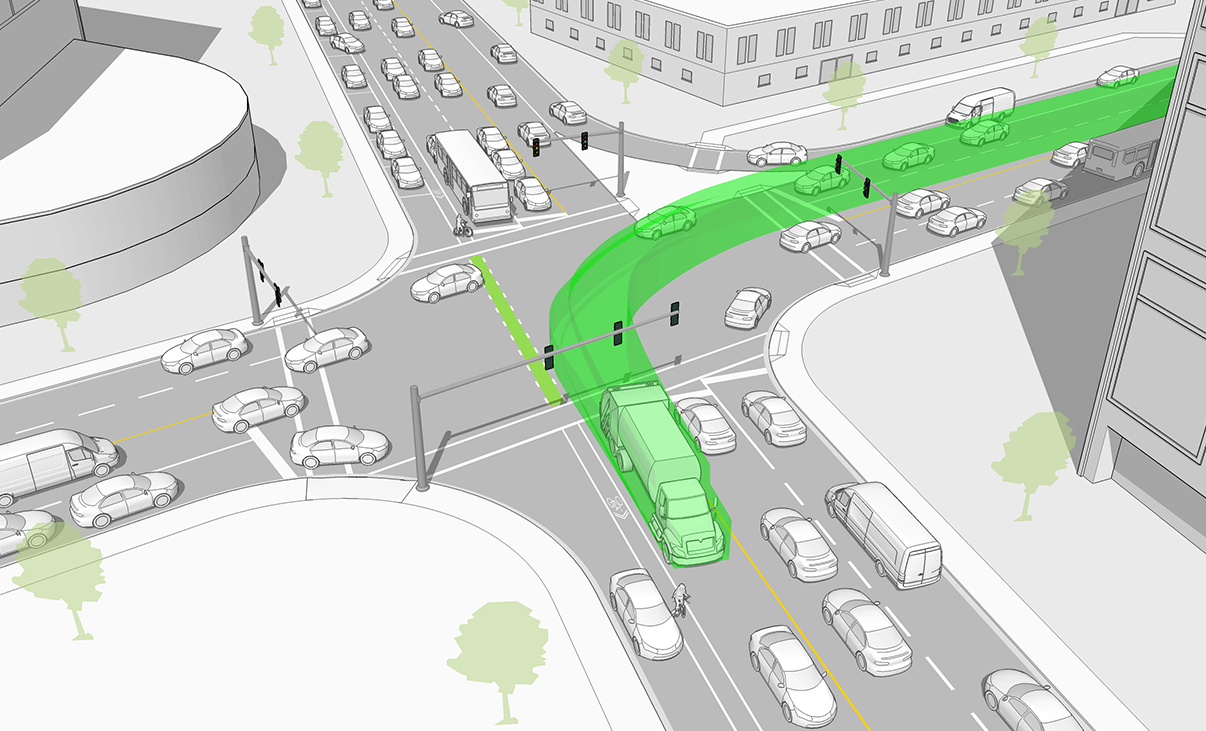
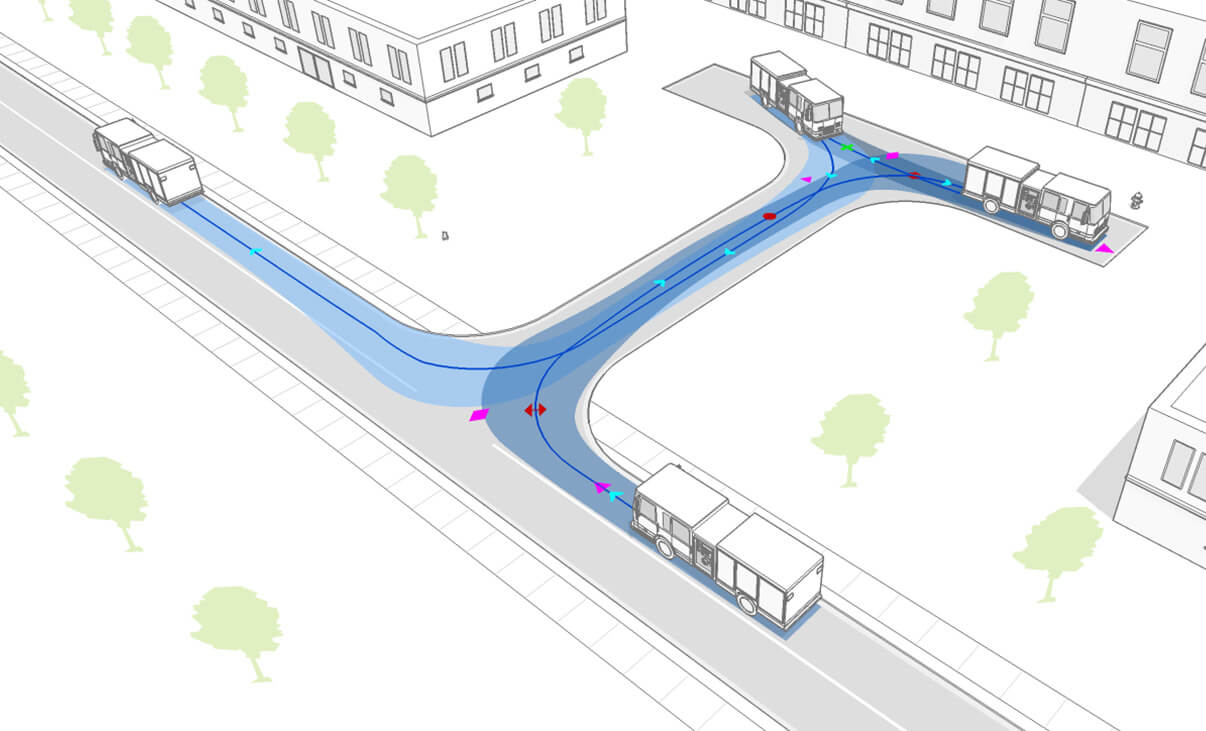
Edit Simulation Paths
차량이 안전하고 효율적으로 기동하는 데 필요한 회전 공간과 주행 궤적(swept path)을 평가하십시오. 또한 승용차, 버스, 굴절식 트럭, 휠 로더 등 어떤 차종이든 노드(node)를 드래그하여 궤적의 다양한 매개변수를 손쉽게 조정할 수 있습니다.
IntelliPath®
AutoTURN이 까다로운 작업을 대신 처리하게 하십시오. 가용 공간과 희망 속도를 바탕으로 가능한 주행 경로를 자동으로 산출해 줍니다.
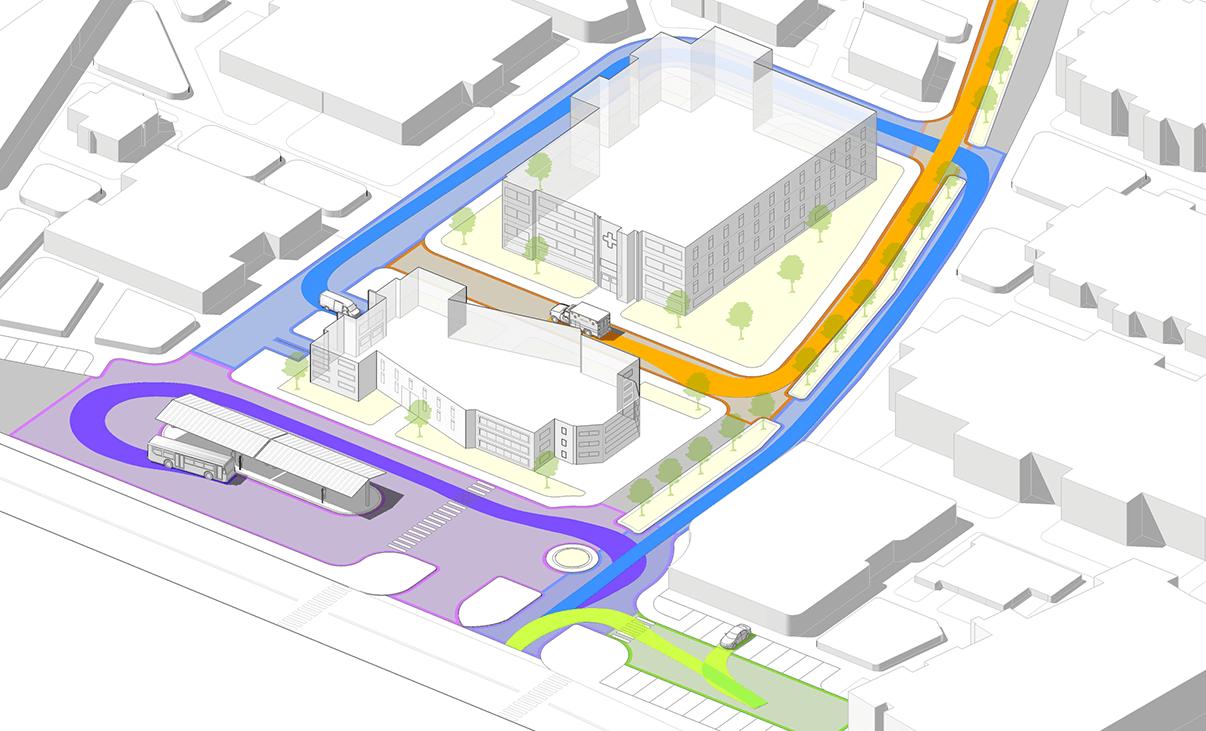
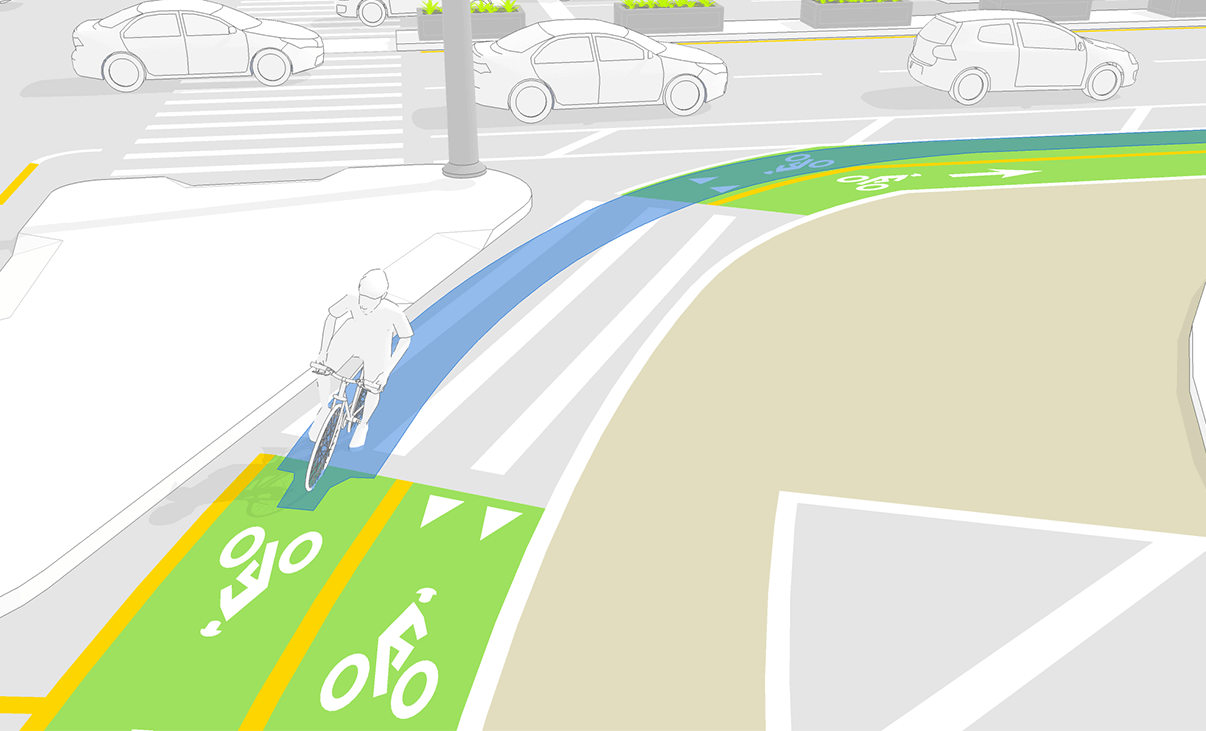
Simulate Bicycle Movements
전 세계 설계 지침에 포함된 12가지 이상의 다양한 자전거 유형(예: 트레일러 장착 자전거, 리컴번트 자전거, 스쿠터 등)을 활용하여 주행 움직임을 시뮬레이션하고, 도로 및 도로 외 설계 프로젝트에서 필요한 회전 공간을 안전하게 확보하십시오.
Sight, Speed and Clearance Analysis
Check Sight Distance
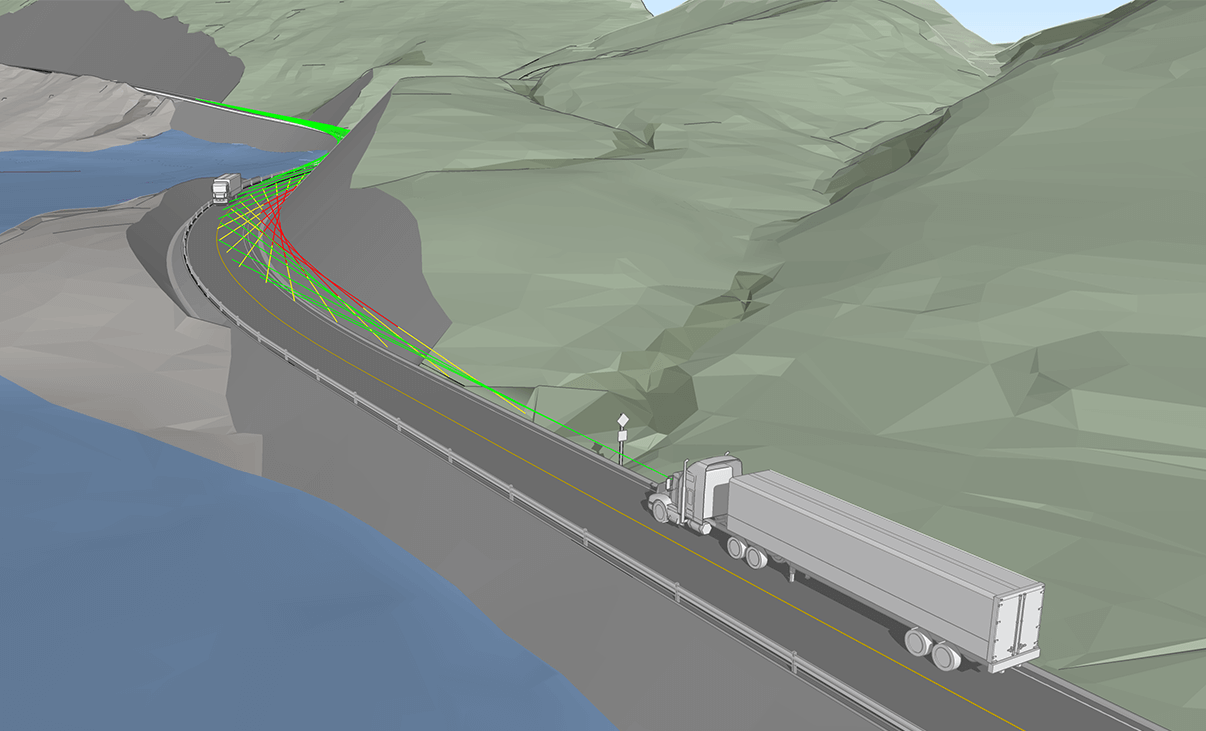
시거(sightline) 확인, 정지 시거, 차량 간격 및 장애물 높이 분석을 통해 운전자가 도로상의 잠재적 위험 요소를 인지하고 대응할 수 있는 충분한 시간을 확보하십시오. 2D 기하 구조(종단 선형) 및 3D 선형 분석을 활용하면 교차로에서의 시야 차단, 지형적 장애물 등으로 인해 발생할 수 있는 사각지대와 같은 잠재적 안전 위험 요소를 파악할 수 있습니다.
Analyze Vertical Profile
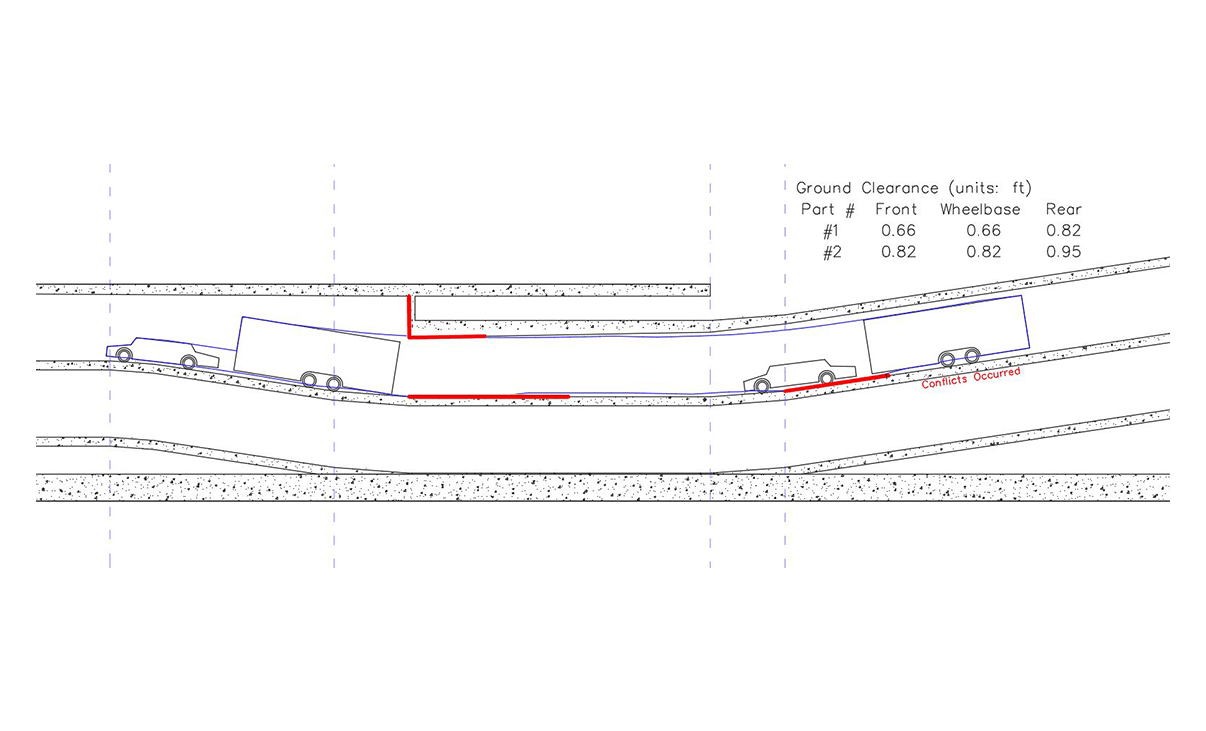
단순 진입로나 경사로에서 차량의 여유 공간(clearance)을 수직 단면으로 확인하십시오. 차량 차체와 지면 간, 또는 차량 지붕 라인과 상부 장애물 간의 간섭이나 여유 공간 부족 문제를 감지할 수 있습니다.
선택한 설계 차량의 지상고를 기준으로 최대 오르막 및 내리막 경사도와 경사 변화 한계(grade-break limits)를 역산하십시오.
Analyze Clearances & Envelopes in 3D
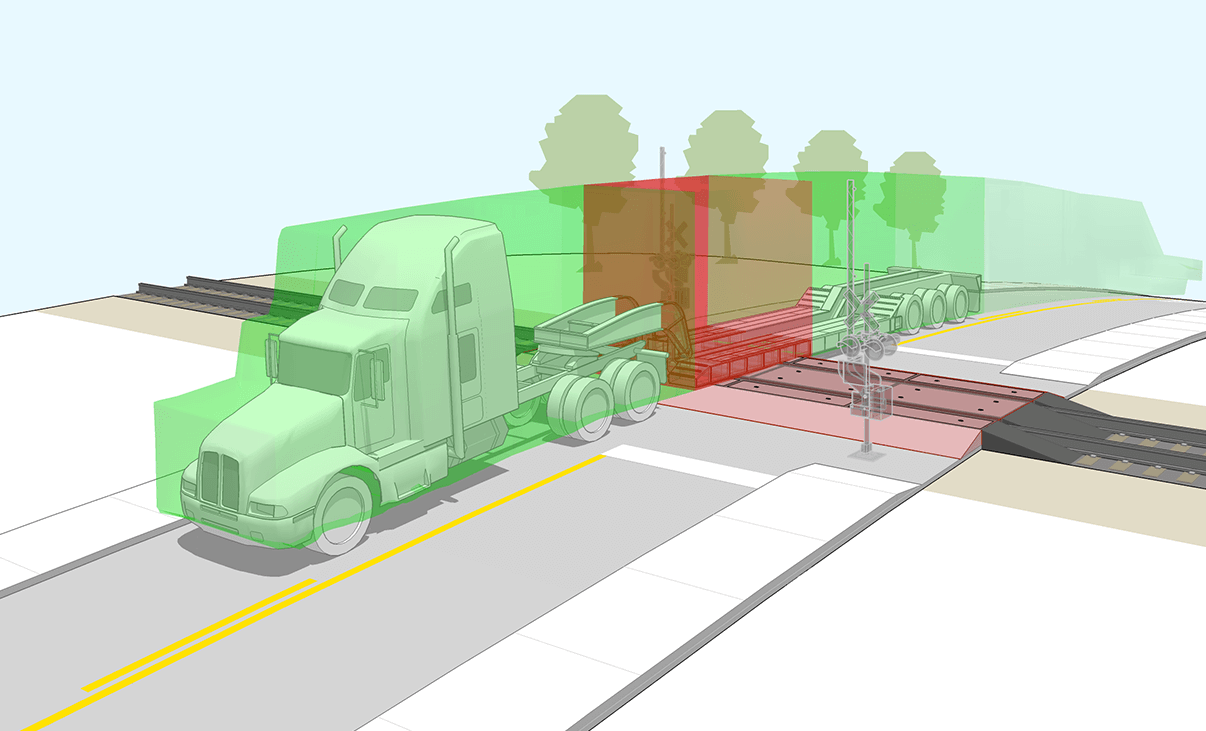
차량과 지형 또는 상부 장애물 간의 잠재적 충돌 위험을 강조하여 보여줍니다. 차량이 지형과 상호작용할 때의 요(yaw), 피치(pitch), 롤(roll) 한계를 고려하여 차량 하부와 지붕 라인까지 모델링한 3D 회전 궤적(swept path)을 즉시 확인할 수 있습니다. 수직 단면도상의 여유 공간(clearance) 검토만으로는 파악하기 어려운 충돌 위험까지 감지해 냅니다.
Check Speed Profiles
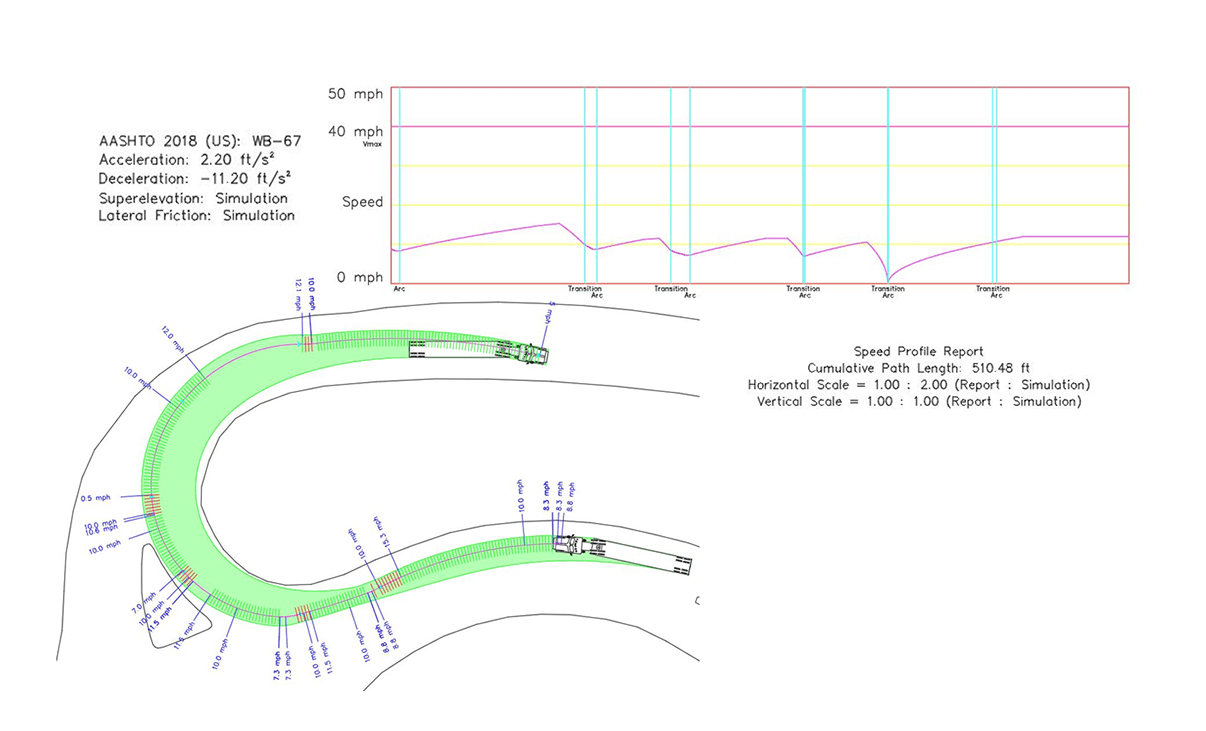
차량의 중심선 궤적 또는 경로를 바탕으로 차량 속도를 분석합니다. 이 분석은 시뮬레이션된 경로를 따라 발생하는 가속, 감속 및 횡방향 마찰을 고려합니다.
Reporting and Presentation
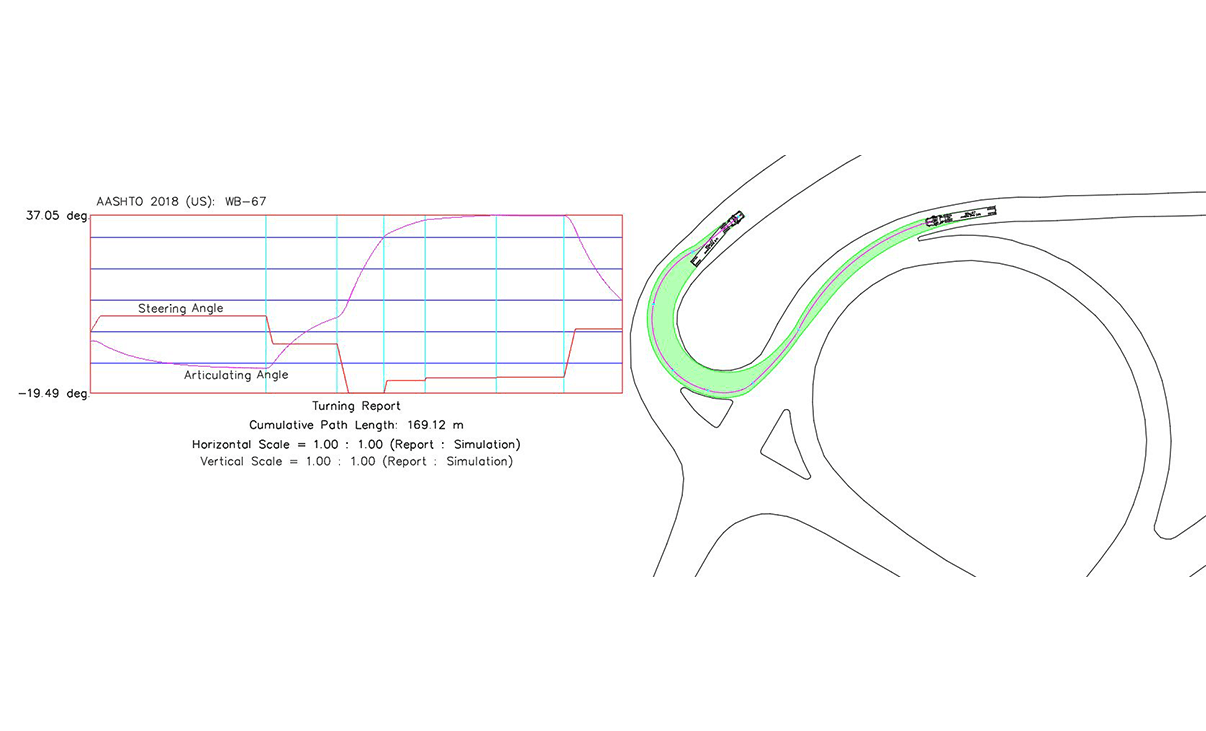
Generate Turning Report
상세 보고서를 생성하여 시뮬레이션에 대해 더 깊이 이해하고 핵심 사항을 파악하거나, 동료 및 이해관계자가 검토할 수 있도록 하십시오. 고객의 요구 사항에 맞춰 시뮬레이션 표시 방식을 구성하거나, 특정 레이어에 개별 요소를 설정하여 표시 기준을 정의하십시오.
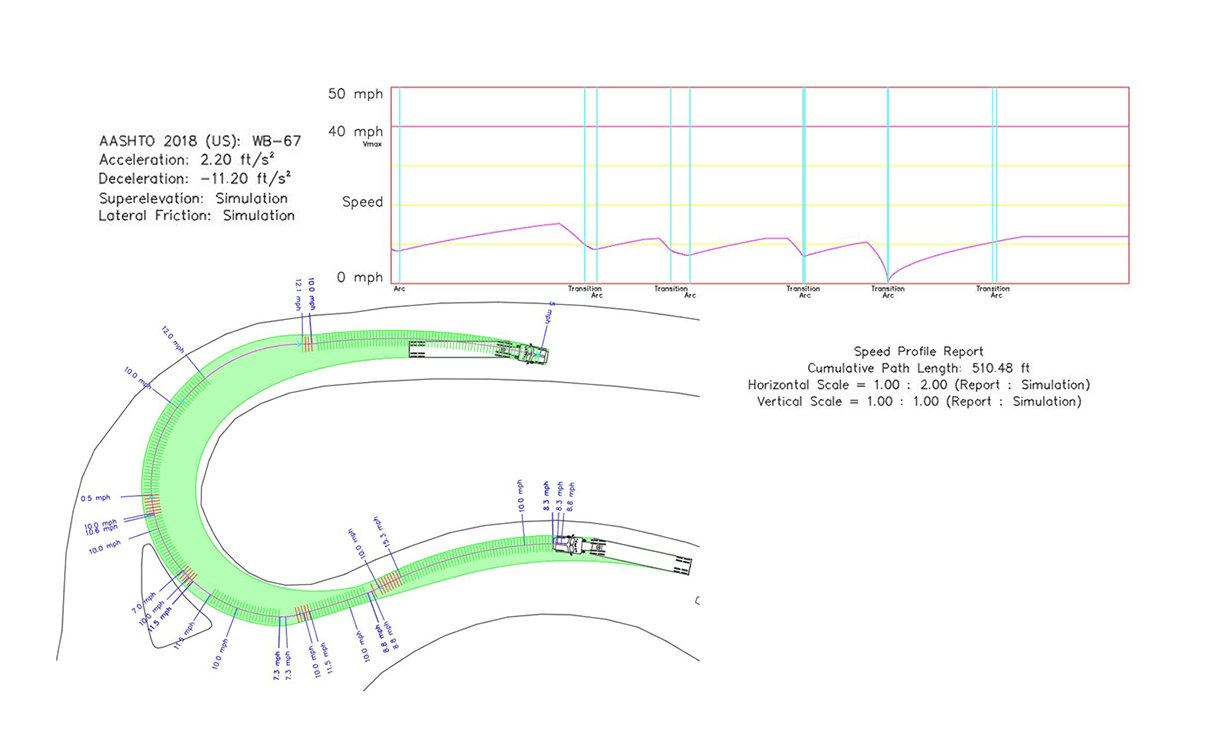
Produce Speed Profiles
가상 경로를 따라 가속, 감속 및 횡방향 마찰을 고려하여 차량 속도를 평가하는 속도 프로파일 보고서를 작성하십시오.
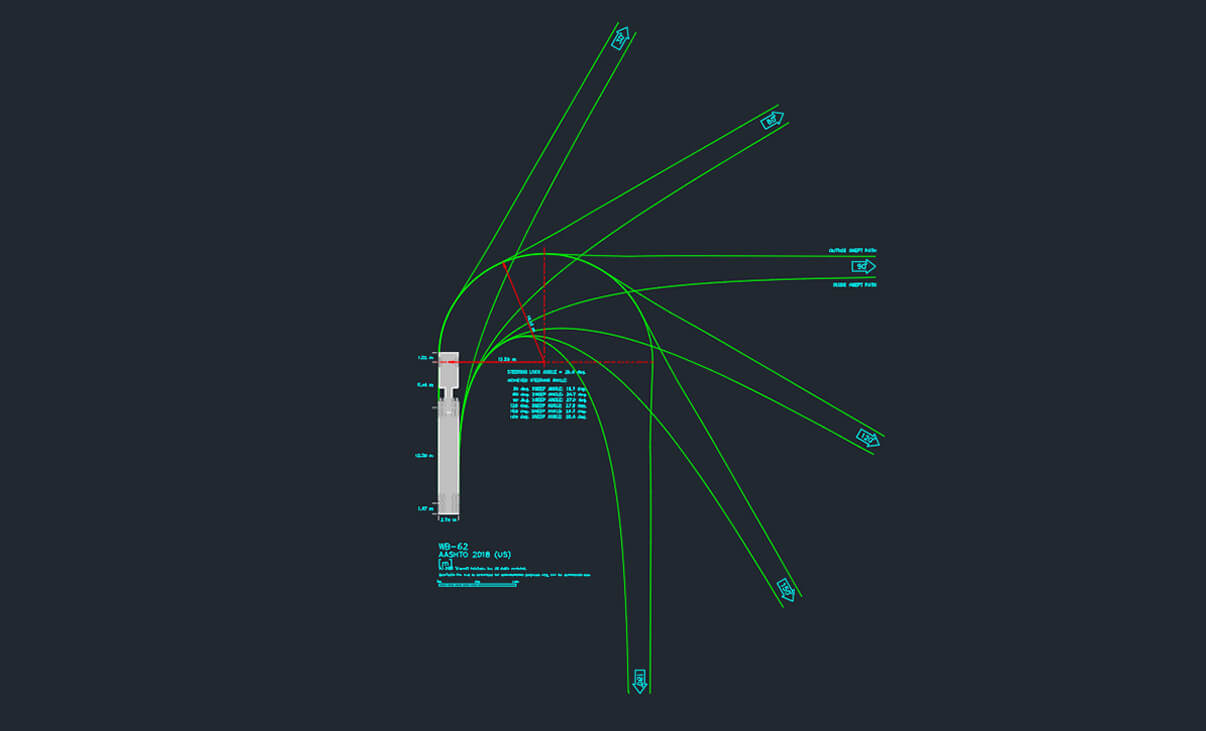
Generate a Turning Template
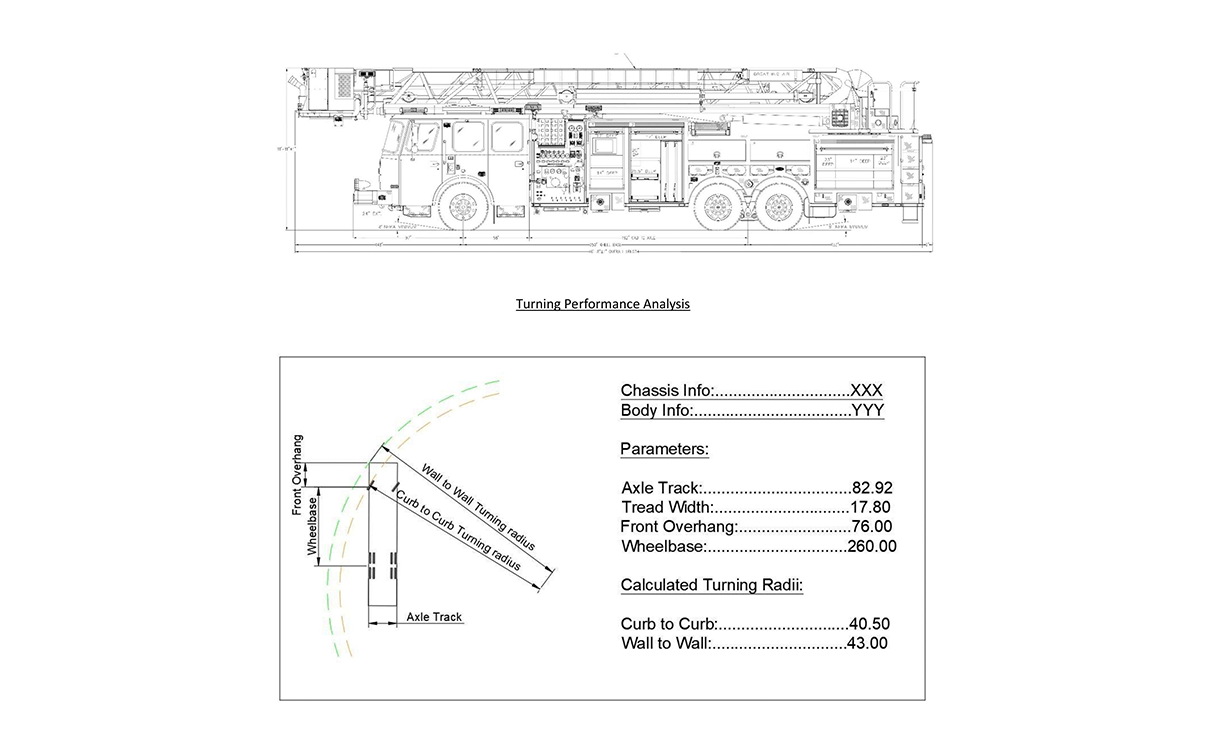
작업 내용을 기록하기 위해, 분석에 사용된 설계 차량의 주요 회전 각도를 보여주는 회전 궤적 템플릿을 생성하십시오.
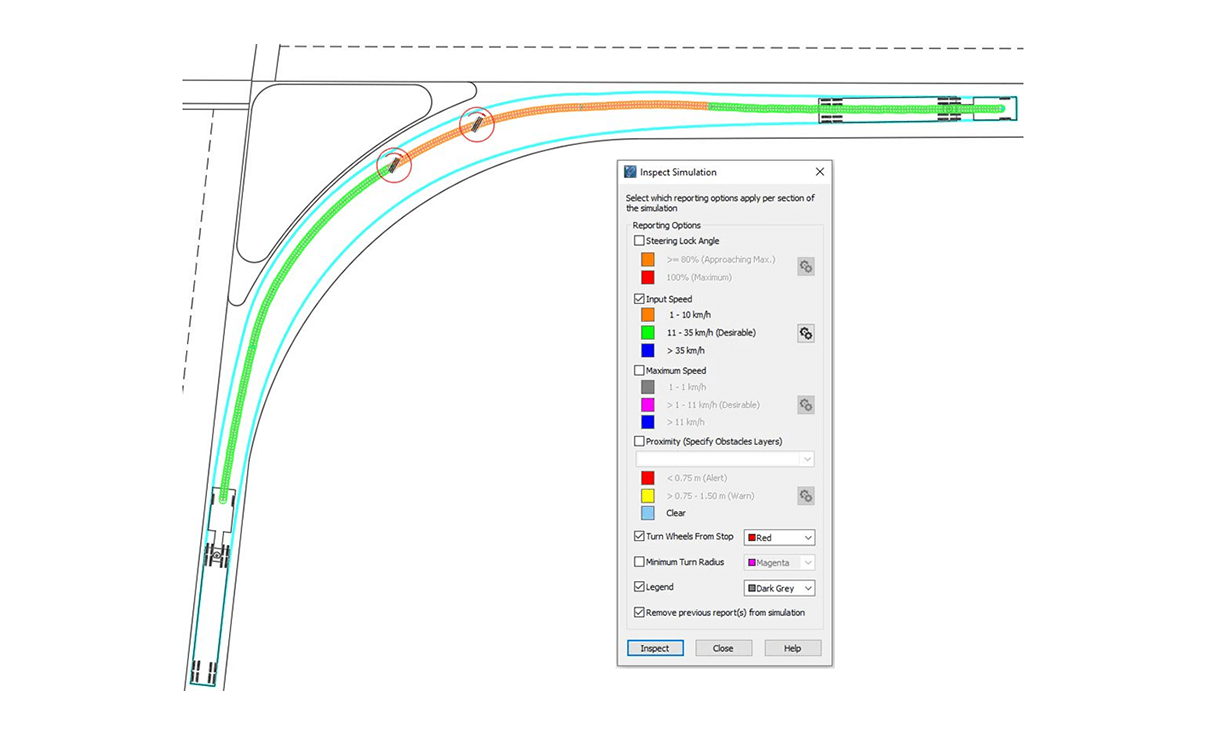
Inspect Simulation
수동으로 생성된 시뮬레이션이 현실적이며 설계 기준을 충족하는지 검토하십시오. 비현실적이거나 급격한 조향 동작이 있는지 확인하고, 다른 차량 및 물체와 해당 차량 간의 근접 상태를 살펴보십시오.
Record and Play Animation
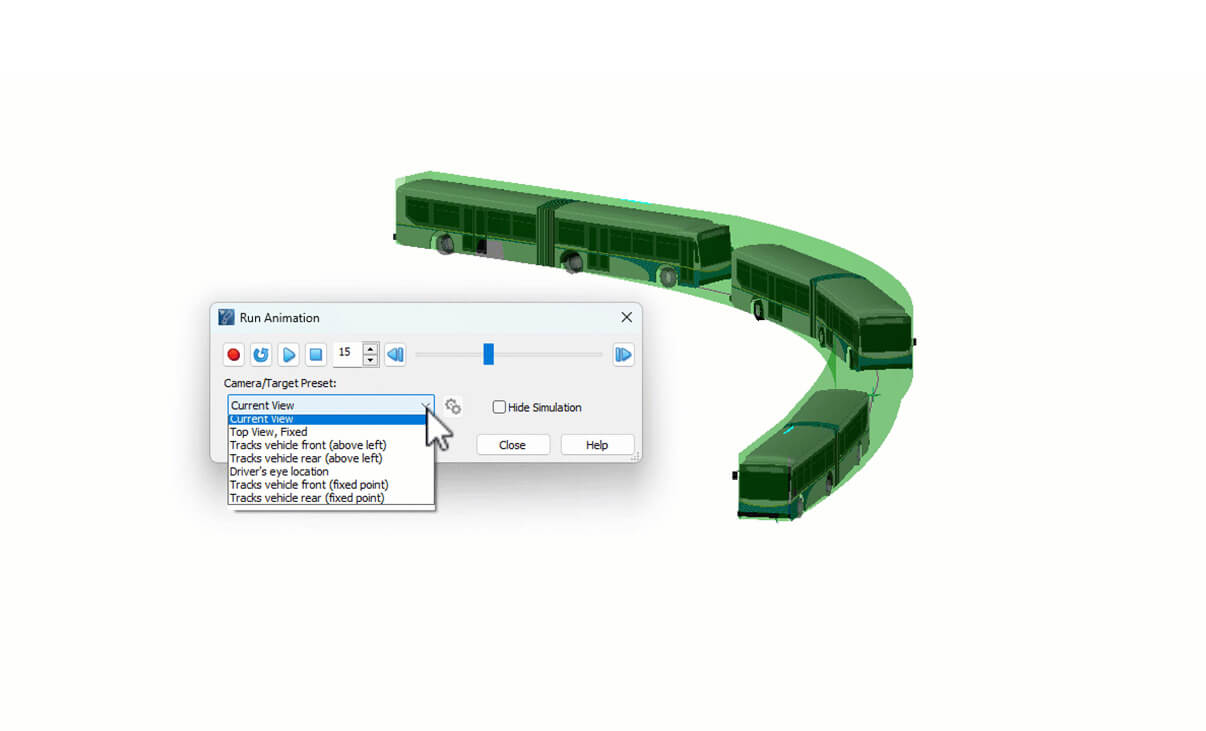
시각화 효과를 높이기 위해 차량 시뮬레이션의 개념적 3D 렌더링을 생성하십시오. 영상을 녹화 및 애니메이션화하여 이해관계자와 공유함으로써 예비 설계 검토 과정에서의 논의를 원활하게 진행할 수 있습니다. 사전 설정된 카메라를 사용하여 재생을 제어하고 다양한 시점에서 영상을 확인하십시오.
Vehicles
Libraries
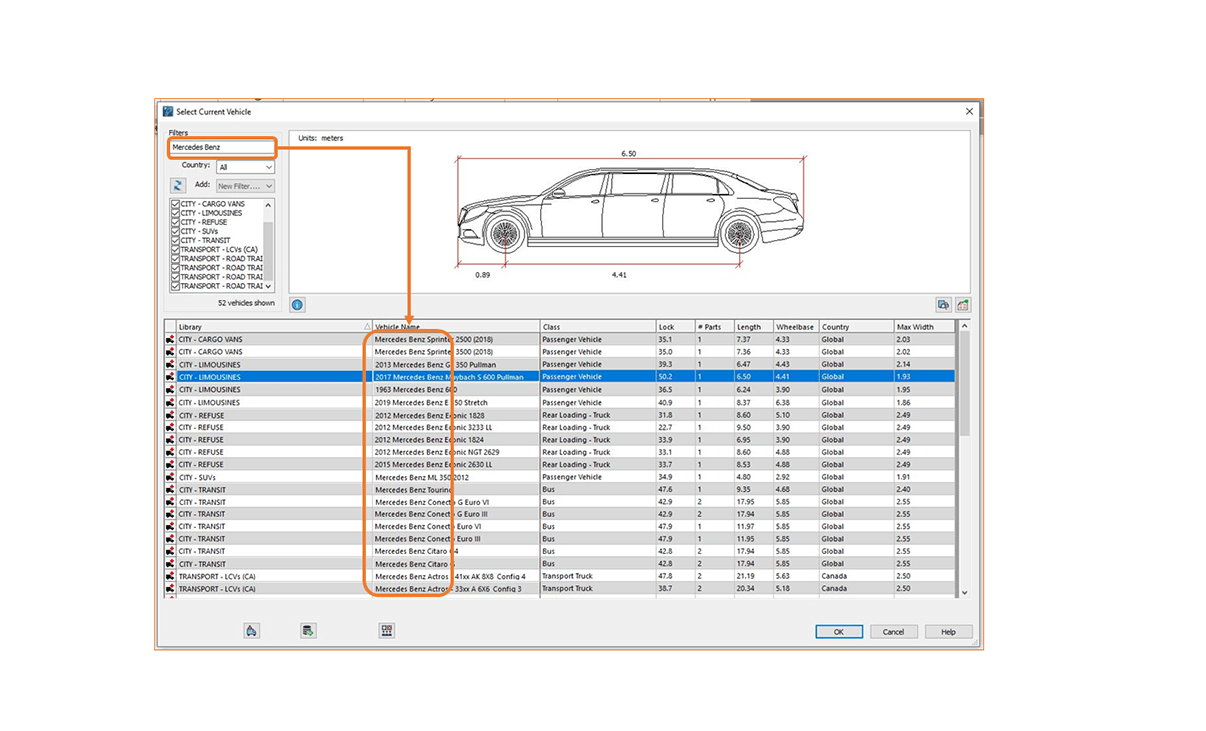
900개 이상의 제조사별 차량과 1,800개 이상의 표준 차량을 라이브러리 이름으로 빠르게 검색하고 필터를 적용하여 결과를 세분화하거나, 각 국가 및 지역의 설계 지침에 부합하는 맞춤형 차량 그룹을 설정할 수 있습니다. 라이브러리는 미국, 캐나다, 호주, 독일, 프랑스, 영국, 네덜란드, 아르헨티나, 브라질, 오스트리아, 케냐, 에티오피아 등 다양한 국가의 지침을 준수하도록 정기적으로 업데이트됩니다.
Create Custom Vehicles
필요한 차량을 찾을 수 없으신가요? 기존 차량의 복사본을 수정하거나 각 구성 요소와 그 특성을 개별적으로 지정하여 맞춤형 차량을 손쉽게 생성할 수 있습니다. 또한 치수, 차축 구성, 조향각은 물론 모서리 라운딩(fillet)이나 모따기(chamfer) 처리를 포함한 차량 외형까지 변경할 수 있습니다.
Oversized & Overload Transport
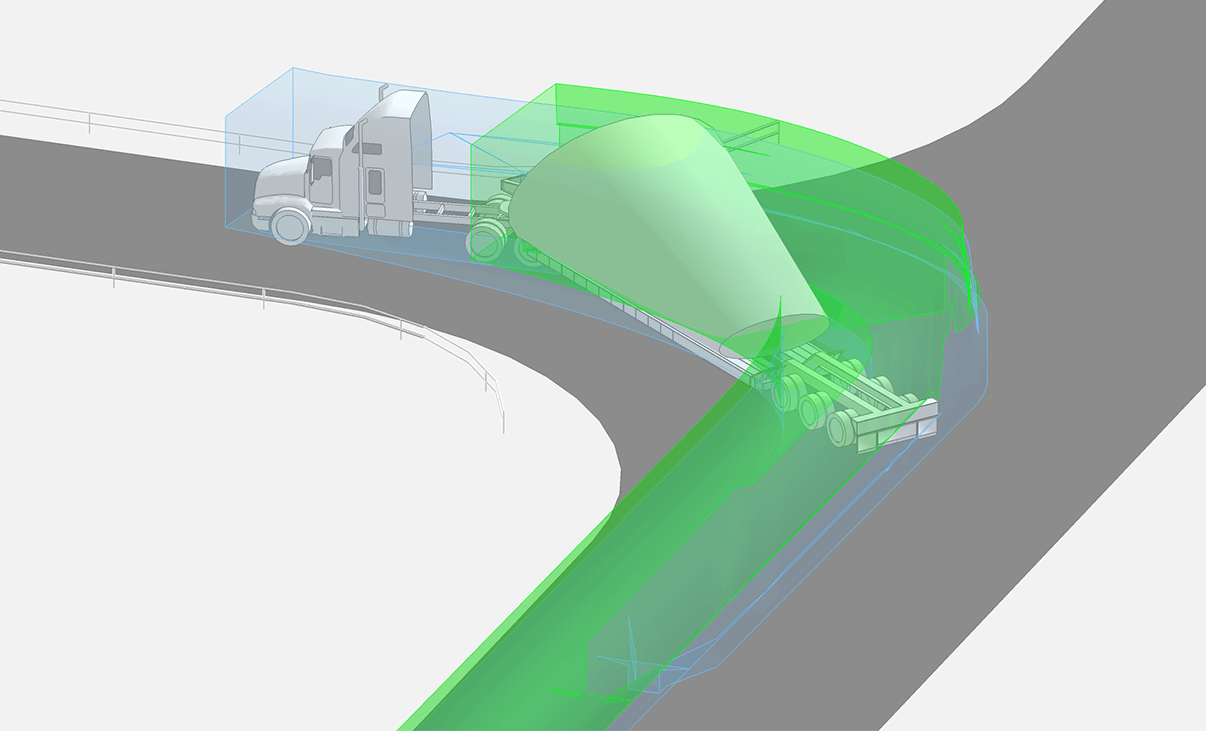
2D 및 3D 설계에서 대형 또는 중량 화물을 운반하는 차량의 회전 공간과 주행 궤적을 검토하여 구조물, 가로등, 각종 설비 등의 시설물과 측면 이격 거리가 충분히 확보되는지 확인하십시오.
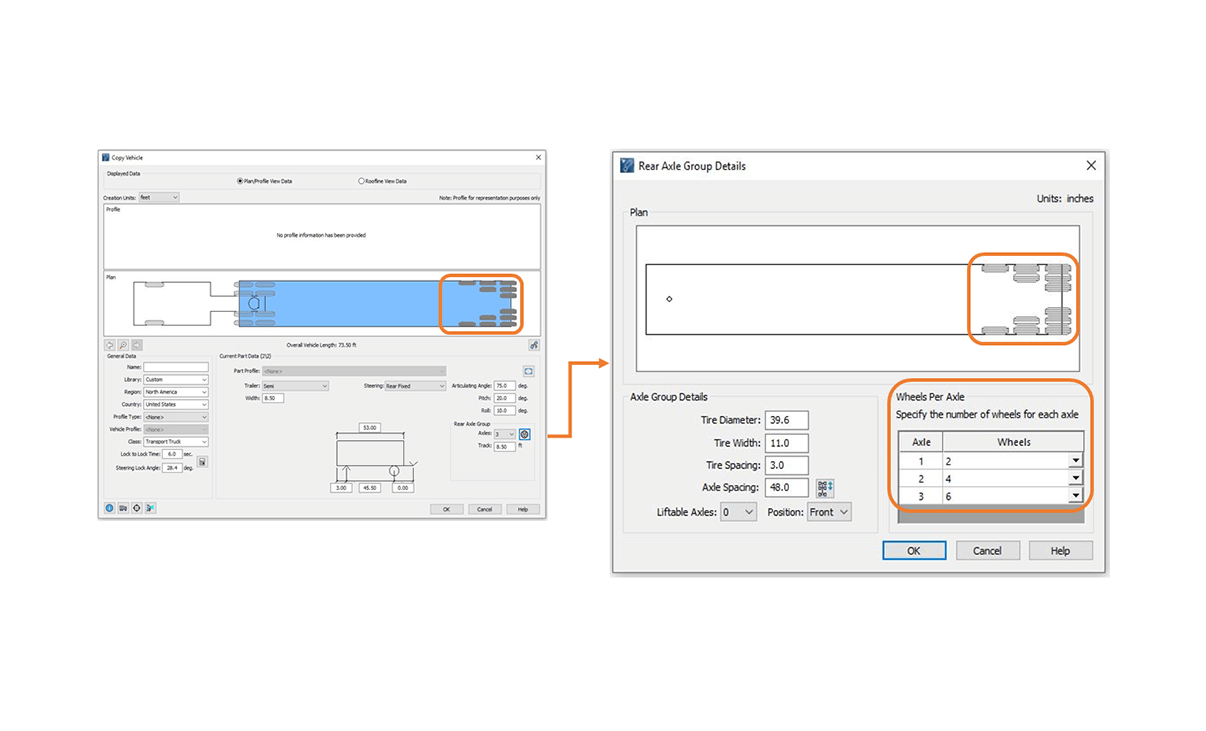
Steering Linkages
조향 차축 그룹 간의 조향 연동 장치(steering linkage)를 정의하고, 사양에 맞춰 차축별 바퀴 구성을 설정하십시오.
풍력 타워 및 블레이드 섹션을 운반하는 트레일러나 변압기 운송 차량과 같은 전자식 조향 시스템을 정밀하게 모델링하거나, 수동 조향 모드를 사용하여 후방 조향 차축을 제어함으로써 원격 조향 시스템을 구현할 수 있습니다.
Compare
AutoTURN Pro와 AutoTURN Online의 기능을 비교하여, 자신의 필요에 가장 적합한 AutoTURN 버전을 찾아보세요.
아직 어떤 AutoTURN 버전이 자신의 프로젝트에 적합한지 확신이 없으신가요? 이 글을 확인해 보세요. 업무에 적합한 AutoTURN 버전을 선택하는 데 도움이 되는 자주 묻는 질문들을 확인할 수 있습니다.
| AutoTURN Pro | AutoTURN Online | |
|---|---|---|
Swept Path Analysis | ||
| Simulate and edit vehicle turning paths | ✓ | ✓ |
| Realistic reverse modes for single and Multi-Part Vehicles | ✓ | ✓ |
| Automate simulations based on space available | ✓ | |
| Simulate bicycles (12+ bicycle types) | ✓ | |
| Simulate turning paths for vehicles with large steering lock angles | ✓ | |
Safety Analysis | ||
| Stopping sight distance in 2D | ✓ | |
| Stopping sight distance in 3D | ✓ | |
| Clearance envelopes in 2D | ✓ | |
| Clearance envelopes in 3D | ✓ | |
| Vehicle conflict detection in 2D | ✓ | |
| Vehicle conflict detection in 3D | ✓ | |
| Speed profile report | ✓ | |
| Inspect other generated simulations | ✓ | |
Vehicle Libraries | ||
| Standard Vehicle Libraries (SVL) | ✓ | ✓ |
| Realistic models in 2D | ✓ | ✓ (selected libraries) |
| Realistic models in 3D | ✓ | |
| Customize Vehicle | ✓ | |
| Manufacturer-Based Vehicle Libraries (MVL) | ✓ | ✓ |
Clearance Analysis | ||
| Vertical geometry clearance simulation | ✓ | |
| Create templates for max uphill and downhill slopes | ✓ | |
| 3D simulation & envelope for underside & terrain and overhead conflicts | ✓ | |
| Multiple cross sections | ✓ | |
| 3D realistic models | ✓ | |
Oversized & Overload Transport Simulation (modeling) | ||
| Autosteer mode – steering linkages | ✓ | |
| Manual steering – Independent rear steering | ✓ | |
| Body articulated vehicles – wheel loaders, compactors and more | ✓ | |
| Loads in 2D | ✓ | |
| Loads in 3D | ✓ | |
| Special Transport | ✓ | |
| Vehicle Library | ✓ | |
Reporting and Presentation | ||
| Speed profile tool | ✓ | |
| Turning report | ✓ | |
| Play and record animation | ✓ | |
| Visualize simulation with conceptual 3D preset | ✓ | |
| Extract, save and export display properties | ✓ | |
| Detailed Layer/Level Control | ✓ |
Product Compatibility Information
AutoTURN 2026.12.1.1
CAD Platform Compatibility (Only 64 bit):
Autodesk® AutoCAD® 2021 – 2027 (except AutoCAD LT)
Autodesk® Civil 3D® 2021 – 2027 alignments
Bentley® MicroStation® CONNECT, 2023, 2024, 2025, 2026
Bentley® OpenRoads Designer CONNECT, 2023, 2024, 2025, 2026
Bentley® OpenBuildings Designer 2023, 2024
Bentley® OpenCities Map (Advanced and Ultimate) 2023, 2024, 2025
Bentley® OpenSite Designer 2023, 2024, 2025, 2026
Bricsys® BricsCAD® Pro V25 – V26
System Requirements:
Workstation: Windows® 11
Network: Windows® Server 2016, 2019, 2022, 2025
AutoTURN Pro 2026.12.1.1
CAD Platform Compatibility (Only 64 bit):
Autodesk® AutoCAD® 2021 – 2027 (except AutoCAD LT)
Autodesk® Civil 3D® 2021 – 2027 alignments
Bentley® MicroStation® CONNECT, 2023, 2024, 2025, 2026
Bentley® OpenRoads Designer CONNECT, 2023, 2024, 2025, 2026
Bentley® OpenBuildings Designer 2023, 2024
Bentley® OpenCities Map (Advanced and Ultimate) 2023, 2024, 2025
Bentley® OpenSite Designer 2023, 2024, 2025, 2026
Bricsys® BricsCAD® Pro V25 – V26*
*The new Visualization Engine is not supported on BricsCAD
Visualization Engine requires DX10, DX11, DX12 capable GPU
Operating System Requirements:
Workstation: Windows® 11
Network: Windows® Server 2016, 2019, 2022, 2025
AutoTURN Online Compatibility Information
[AutoTURN 견적 요청]
Licensing Options
Transoft offers a range of licensing options to help small, sole proprietorships right on up to the largest multinational organizations meet their transportation design and analysis needs.
User Subscription
User Subscription License (USL) is a model where a set number of Subscribed Users are assigned dedicated access to the software through their unique logins for the duration of the license term. The software can be installed and used by a Subscribed User on multiple workstations.
Each Subscribed User represents one individual and their login and password, which cannot be shared with other users. Software activation is an easy process and can be done over the Internet.
Why Choose the USL Option
User Subscription License offers a cost-effective way for small businesses to start with one user and grow by adding additional users. For larger organizations, it will offer more flexibility in user administration and management via the My Transoft Portal. Furthermore, it can easily handle scalability and budgeting as per the business needs defined by the number of users.
Key Benefits of USL License
- Automatic updates, new features, and content
Bug fixes, compatibility, and new version releases. - Easily manage your changing business needs
With enhanced scalability and user management. - Install the software and log in from anywhere
Access your workstation, laptop, or personal desktop. - Unlimited technical support
Receive premium assistance for all your deployments and technical support needs. - Invitations to learning-focused webinars
Attend learning-focused webinars from our product experts and learn how our software can help streamline design processes. - Flexible user license options
Choose from single to multiple user packages to meet your business needs. - Simple user administration
User Management can be performed in the My Transoft Portal, via invitation links or by Identity Provider Single Sign-on with User Provisioning.
Have more questions about USL? See the FAQ here.
Team Subscription
Team Subscription License (TSL) is a license option that is intended to support casual or occasional users of the software. The size of a TSL is represented as a number of allocatable seats.
Why Choose the TSL Option
While User Subscription Licenses are better for dedicated users, Team Subscription Licenses can be a good complement to these if your organization has occasional, less heavy users of the software.
How it Works
Each user of a TSL must have an account in the My Transoft Portal to request a license. Internet access is required for this process.
When an end user starts the software product on their workstation, the software will connect to the My Transoft Portal and will determine if any of the seats are available. If a seat is available, it will be allocated and dedicated to that end user who will have unrestricted access to it for 24 hours. At the end of the 24-hour period the seat allocation will automatically expire, and another user will be able to claim it.
Once all the TSL seats are allocated at a given time, no other end user will be able to use that license until the 24-hour period expires and one of the seats is automatically deallocated.
Key Benefits of TSL
- More flexibility for your team members
Allows access to software for casual users without having to spend on dedicated licenses for all users. - Less administrative effort by IT
Easy access to software for casual users without IT having to allocate or transfer licenses amongst team members, self-administered by users with automatic 24-hour lock. - Combined Team & User Subscription option
Flexibility of mixing plans according to the needs of different user types. - Automatic updates, new features, and content
Bug fixes, compatibility, new version releases, or vehicle guidelines are automatically available to you. - Easily manage your changing business needs
With enhanced scalability and user management. - Install the software and log in from anywhere
Access your workstation, laptop, or personal desktop with Single Sign-on. - Unlimited technical support
Receive premium assistance for all your deployments and technical support needs. - Invitations to learning-focused webinars
Attend learning-focused webinars from our product experts and learn how our software can help streamline design processes. - Simple user administration
User Management can be performed in the My Transoft Portal, via invitation links or by Identity Provider Single Sign-on with User Provisioning.
AutoTURN 한국 판매처 및
공인 리셀러
크라이스아이앤씨는 AutoTURN 한국 판매처로서 라이선스 구매 및 갱신에 필요한 상담과 견적을 제공합니다.
주식회사 크라이스아이앤씨는 2003년에 설립되어 Transoft Solutions 사의 AutoTURN 제품을 2018년도부터 판매해오고 있으며, 한국 공인 리셀러 입니다.
크라이스아이앤씨 는 국내 대표적인 IT 소프트웨어공급사로 한국 국내에 기업,학교,연구기관 및 공공기관등 여러 각종 전문분야에 종사하시는 분들에게 맞는 제품을 공급해드리고 있으며, 구매하신 소프트웨어제품의 업데이트와 필요시 업그레이드 지원을 하고 있습니다.
고객들이 해외소프트웨어구매시 어려움이 없게 크라이스아이앤씨 자체쇼핑몰 kreissoft.co.kr 를 운영해오고 있으며 또한 설계,디자인,영상,음악등 엔터테인먼트 분야에 특화된 쇼핑몰 Dez.co.kr 도 같이 운영하고 있습니다.
일반 고객들도 쉽고 편하게 이용할수 있도록 네이버 스마트스토어에 2018년도부터 입점하여 당사가 취급하는 전제품을 올려놓았으며 그동안 고객지원에 힘쓴결과 2022년 네이버파트너 인증을 받았습니다.