
EDIUS 한국 판매처입니다.
크라이스아이앤씨는 EDIUS 한국 공인 리셀러로서 국내 기업, 학교, 연구기관 및 개인 고객을 대상으로 에디우스라이선스를 공급하고 있습니다. EDIUS 라이선스 종류와 가격, 구매 방법에 대한 문의 및 견적 상담이 가능합니다. 다양한 소프트웨어 제품은 소프트웨어 제품 목록에서 확인하실 수 있습니다.
가격 및 구매 안내
| 제품명 | 가격(VAT포함) |
|---|---|
| EDIUS 11 Pro: | 811,800원 |
| EDIUS X Workgroup: | 2,145,000원 |
| 교육용 EDIUS 11 Pro: | 311,300원 |

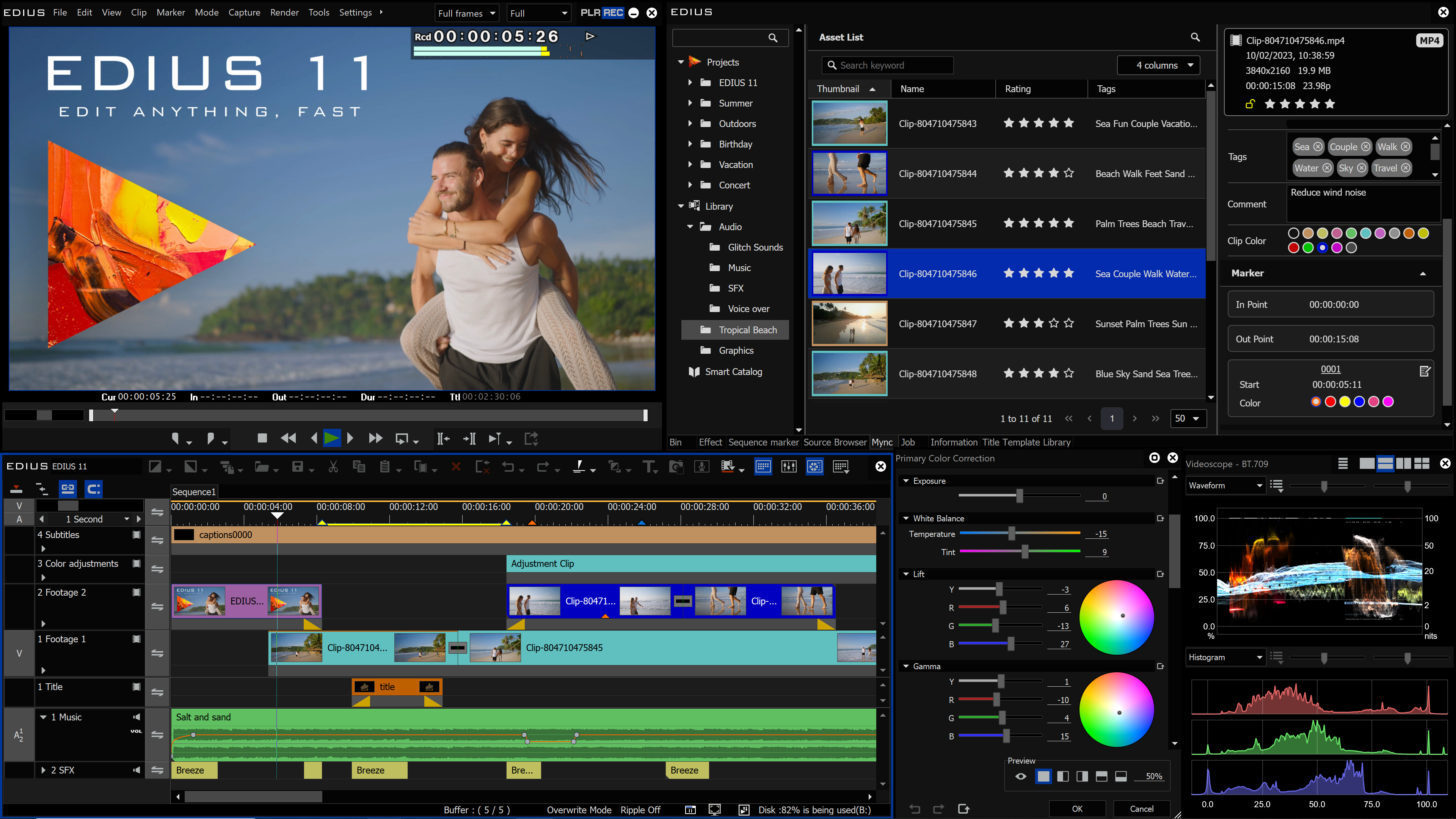
EDIUS는 전문가와 열정적인 영상 애호가 모두에게 이상적인 편집 소프트웨어입니다. 영화 제작자, 영상 저널리스트, 유튜버, 대학, 방송사, 영화 스튜디오, 제작사, 정부 기관 등 다양한 분야의 사용자들이 EDIUS를 활용하고 있습니다.
EDIUS는 뛰어난 시스템 안정성을 바탕으로 렌더링을 위해 대기할 필요 없이 직관적이고 신속한 작업을 가능하게 하여, 사용자의 창의성과 생산성을 저해하지 않습니다.
EDIUS는 최신 녹화 포맷, 카메라, 코덱을 네이티브로 지원합니다. 이를 통해 색 보정 및 각종 필터 적용을 포함한 다수의 4K 영상 레이어를 실시간으로 동시에 처리할 수 있습니다.
EDIUS offers Background Rendering making the workflow smooth, creative, and virtually unstoppable. EDIUS further supports High Dynamic Range (HDR) in a most user friendly way including import, editing and export like no other editing solution. The 64-bit program also supports I/O cards from manufacturers such as AJA and Blackmagic Design and seamlessly integrates existing hardware. Furthermore, EDIUS includes an enhanced Mync program to organise and share footage and other media files.
EDIUS 11 is out now! This video presents the new great features in EDIUS 11, Mync 11 and the new Chorus Hub Server.
The video is in English with subtitles in Chinese, Czech, Dutch, French, German, Hindi, Italian, Japanese, Korean, Spanish, Polish and more languages.
Comparison table EDIUS 11 Pro / Workgroup / Broadcast
| Feature | EDIUS 11 Pro | EDIUS 11 Workgroup | EDIUS 11 Broadcast |
| 8K support (project setting and export) | Yes | Yes | Yes |
| FTP uploading and downloading | No | Yes | Yes |
Title Insertion Mode | No | Yes | Yes |
| Editing while recording capture | No | Yes | Yes |
| Monitor control | No | Yes | Yes |
| Audio monitoring mode | No | Yes | Yes |
Loudness meter | No | Yes | Yes |
Audio bitstream pass-through | No | Yes | Yes |
Advanced MXF file exporting | No | Yes | Yes |
Video-out conversion (via I/O hardware) | No | Yes | Yes |
Video-out support for UHD/4K 50/60p (via I/O hardware) | No | Yes | Yes |
Offline activation and offline editing | No | No | Yes |
Usage of eID can be skipped | No | No | Yes |
Import of Dolby Digital Professional and Dolby Digital Plus formats | No | No | Yes |
Output of Dolby Digital Professional and Dolby Digital Plus formats | No | No | Yes |
K2 connection (SAN) | No | Optional | Optional |
K2 connection (FTP) | No | Optional | Optional |
Avid DNxHD codec Support | MOV only | MOV+MXF | MOV+MXF |
EDIUS 11 Pro
Standard version for individual users
- EDIUS 11 Pro Full version – This is the version for you if this is the first time you purchase EDIUS Pro.
- EDIUS 11 Pro Upgrade from EDIUS X Pro or EDIUS X Workgroup – This is the version for you if you already have EDIUS X. When activating the program you will have to type in your EDIUS X serial number as well.
- EDIUS 11 Pro Jump Upgrade – This is the version for you if you already have EDIUS version 2-9, EDIUS Neo 1-3.5, EDIUS EDU (educational version) or EDIUS Pro Home Edition. When activating the program you will have to type in your previous EDIUS serial number as well.
- EDIUS 11 Pro Jump 2 Upgrade (Crossgrade) – Please use this offer if you already have a video editing software (with a purchase price exceeding 100 EUR) and would like to change to EDIUS. You will need to fill out a document proving that the software you are changing from is worth more than 100 EUR. Your authorised reseller is happy to answer any questions regarding this offer.
- EDIUS 11 Pro EDU (educational version) – This version is available for students, teachers, universities and schools. Please note that the EDU version may not be used commercially and it can only be upgraded by using a Jump upgrade (i.e. not the standard upgrade). When purchasing an EDU version you have to prove that you are a student, teacher, university or school to be able to receive the license key. Your authorised reseller is happy to give you any information you need on this offer.
EDIUS 11 Workgroup
With extended possibilities for format support and integration
- EDIUS 11 Workgroup Full version – This is the version for you if this is the first time you purchase EDIUS Workgroup.
- EDIUS 11 Workgroup Upgrade from EDIUS X Workgroup – This is the version for you if you already have EDIUS Workgroup X. When activating the program you will have to type in your EDIUS X Workgroup serial number as well.
- EDIUS 11 Workgroup Jump Upgrade from EDIUS 2-9, EDIUS X Pro or EDIUS 11 Pro – this is the version for you if you already have EDIUS version 2-9 (Workgroup or Pro), EDIUS X Pro or EDIUS 11 Pro. When activating the programme you will need to type in your previous EDIUS serial number as well.
- EDIUS 11 Workgroup Jump 2 Upgrade (Crossgrade) – Please use this offer if you already have a video editing software (with a purchase price exceeding 200 EUR) and would like to change to EDIUS. You will need to fill out a document proving that the software you are changing from is worth more than 200 EUR. Your authorised reseller is happy to answer any questions regarding this offer.
- EDIUS 11 Workgroup EDU (educational version) – This version is available for students, teachers, universities and schools. Please note that the EDU version may not be used commercially and it can only be upgraded by using a Jump upgrade (i.e. not the standard upgrade). When purchasing an EDU version you have to prove that you are a student, teacher, university or school to be able to receive the license key. Your authorised reseller is happy to give you any information you need on this offer.
EDIUS 11 Broadcast
Like the Workgroup version but especially designed for broadcasters including Dolby Professional license for broadcasting
- EDIUS 11 Broadcast – This is the version for you if you are a broadcaster and it is the first time you purchase EDIUS.
- EDIUS 11 Broadcast Jump Upgrade – this is the version for you if you are a broadcaster and already have EDIUS 2-X (Pro or Workgroup). When activating the program you will need to type in your previous EDIUS serial number as well.
Options
- EDIUS 11 Authoring Option – with this option you can add the DVD/Blu-ray authoring function (this option requires an optical disc drive).
- EDIUS 11 Second Activation Option – with this option you can activate your EDIUS Pro or Workgroup License on a second PC. This option is only available for the Pro and Workgroup versions and only in cases where the owner of the license and the user of the Second Activation is the same individual.
EDIUS 11 Pro, Pro EDU, Workgroup and Broadcast are also available as Floating License.
Please note: for Stereoscopic (3D) editing we recommend using EDIUS X. This function has only been used by very few users in the past, therefore, stereoscopic editing is no longer supported in EDIUS 11.
Below you find a comparison between EDIUS X Pro and EDIUS X Workgroup:
| Feature | EDIUS X Pro | EDIUS X Workgroup |
| 8K support (project setting and export) | No | Yes |
| FTP uploading and downloading | No | Yes |
Title Insertion Mode | No | Yes |
| Editing while recording capture | No | Yes |
| Monitor control | No | Yes |
| Audio monitoring mode | No | Yes |
Loudness meter | No | Yes |
Audio bitstream pass-through | No | Yes |
Generic MXF file exporting | No | Yes |
Video-out conversion (via I/O hardware) | No | Yes |
Video-out support for UHD/4K 50/60p (via I/O hardware) | No | Yes |
Offline activation and offline editing | No | Yes |
Usage of eID can be skipped | No | Yes |
Import of Dolby Digital Professional and Dolby Digital Plus formats | No | Optional |
Output of Dolby Digital Professional and Dolby Digital Plus formats | No | Optional |
GV STRATUS support | No | Optional in the future |
EDIUS XRE support | No | Optional in the future |
K2 connection (SAN) | No | Optional |
K2 connection (FTP) | No | Optional |
Avid DNxHD codec Support | Optional | Yes |
EDIUS X Pro
- EDIUS X Pro full version – This is the version for you if this is the first time you purchase EDIUS Pro.
- EDIUS X Pro Upgrade from EDIUS Pro 9 or EDIUS Workgroup 9 – This is the version for you if you already have EDIUS 9. When activating the program you will have to type in your EDIUS 9 serial number as well.
- EDIUS X Pro Jump Upgrade – This is the version for you if you already have EDIUS version 2-8, EDIUS Neo 1-3.5, EDIUS EDU (educational version) or EDIUS Pro Home Edition. When activating the program you will have to type in your previous EDIUS serial number as well.
- EDIUS X Pro Jump 2 Upgrade (Crossgrade) – Please use this offer if you already have a video editing software (with a purchase price exceeding 200 EUR) and would like to change to EDIUS. You will need to fill out a document proving that the software you are changing from is worth more than 200 EUR. Your authorised reseller is happy to answer any questions regarding this offer.
- EDIUS X Pro EDU (educational version) – This version is available for students, teachers, universities and schools. Please note that the EDU version may not be used commercially and it can only be upgraded by using a Jump upgrade (i.e. not the standard upgrade). When purchasing an EDU version you have to prove that you are a student, teacher, university or school to be able to receive the license key. Your authorised reseller is happy to give you any information you need on this offer.
- EDIUS X Pro Home Edition – This version is available for private users and may not be used commercially. It can only be upgraded by using a Jump upgrade (i.e. not the standard upgrade) and only 1 PC can be activated at the same time.
EDIUS X Workgroup
- EDIUS X Workgroup full version – This is the version for you if this is the first time you purchase EDIUS Workgroup.
- EDIUS X Workgroup Upgrade from Workgroup 9 – This is the version for you if you already have EDIUS Workgroup 9. When activating the program you will have to type in your EDIUS 9 serial number as well.
- EDIUS X Workgroup Jump Upgrade from EDIUS 2-8, EDIUS Pro 9 or EDIUS X Pro – this is the version for you if you already have EDIUS version 2-8 (Workgroup or Pro), EDIUS Pro 9 or EDIUS X Pro. When activating the programme you will need to type in your previous EDIUS serial number as well.
- EDIUS X Workgroup Jump 2 Upgrade (Crossgrade) – Please use this offer if you already have a video editing software (with a purchase price exceeding 200 EUR) and would like to change to EDIUS. You will need to fill out a document proving that the software you are changing from is worth more than 200 EUR. Your authorised reseller is happy to answer any questions regarding this offer
- EDIUS X Workgroup EDU (educational version) – This version is available for students, teachers, universities and schools. Please note that the EDU version may not be used commercially and it can only be upgraded by using a Jump upgrade (i.e. not the standard upgrade). When purchasing an EDU version you have to prove that you are a student, teacher, university or school to be able to receive the license key. Your authorised reseller is happy to give you any information you need on this offer.
EDIUS X Floating License – read more.
Below you find a comparison between EDIUS Workgroup 9 and EDIUS Pro 9:
EDIUS Pro 9
- EDIUS Pro 9 full version – This is the version for you if this is the first time you purchase EDIUS Pro.
- EDIUS Pro 9 Upgrade from EDIUS Pro 8 or EDIUS Workgroup 8 – This is the version for you if you already have EDIUS 8. When activating the program you will have to type in your EDIUS 8 serial number as well.
- EDIUS Pro 9 Jump Upgrade – This is the version for you if you already have EDIUS version 2-7, EDIUS Neo 1-3.5, EDIUS EDU (educational version) or EDIUS Pro 8 Home Edition. When activating the program you will have to type in your previous EDIUS serial number as well.
- EDIUS Pro 9 Jump 2 Upgrade (Crossgrade) – Please use this offer if you already have a video editing software (with a purchase price exceeding 200 EUR) and would like to change to EDIUS. You will need to fill out a document proving that the software you are changing from is worth more than 200 EUR. Your authorised reseller is happy to answer any questions regarding this offer.
- EDIUS Pro 9 EDU (educational version) – This version is available for students, teachers, universities and schools. Please note that the EDU version may not be used commercially and it can only be upgraded by using a Jump upgrade (i.e. not the standard upgrade). When purchasing an EDU version you have to prove that you are a student, teacher, university or school to be able to receive the license key. Your authorised reseller is happy to give you any information you need on this offer.
- EDIUS Pro 9 Home Edition – The EDIUS Home Edition licence may not be used commercially and it can only be upgraded by using a Jump upgrade (i.e. not the standard upgrade).
EDIUS Workgroup 9
- EDIUS Workgroup 9 full version – This is the version for you if this is the first time you purchase EDIUS Workgroup.
- EDIUS Workgroup 9 Upgrade from Workgroup 8 – This is the version for you if you already have EDIUS Workgroup 8. When activating the program you will have to type in your EDIUS 8 serial number as well.
- EDIUS Workgroup 9 Jump Upgrade from EDIUS 2-7 or EDIUS Pro 8 – this is the version for you if you already have EDIUS version 2-7 (Workgroup or Pro) or EDIUS Pro 8. When activating the programme you will need to type in your previous EDIUS serial number as well.
- EDIUS Workgroup 9 EDU (educational version) – This version is available for students, teachers, universities and schools. Please note that the EDU version may not be used commercially and it can only be upgraded by using a Jump upgrade (i.e. not the standard upgrade). When purchasing an EDU version you have to prove that you are a student, teacher, university or school to be able to receive the license key. Your authorised reseller is happy to give you any information you need on this offer.
EDIUS 9 Floating License – read more.
Here you can find more information about the differences between EDIUS Pro 9 and EDIUS Workgroup 9.
Minimum System Requirements (standalone)
[EDIUS 11]
CPU: Intel 5th Gen or newer or equivalent AMD CPU
Memory: 8 GB RAM or more | for 4K/8K projects 16 GB or more
Hard Disk: SSD (Recommendation)
Graphics Card: 1 GB VRAM or more | for 4K/8K projects 2 GB or more | for VisTitle Pixel Shader 3.0 and Direct X 11 (intel UHD Graphics 630, NVIDIA GTX1050, Radeon HD 2600 or better)
Sound Card: Sound card with WDM driver support
Network: Internet connection required for initial software license activation, thereafter once per month to maintain usage | Offline activation and usage possible for EDIUS 11 Workgroup
OS: Windows 10 64-bit version 21H2 or later, Windows 11, changes can be made at any time without notice.
Supported Languages: English, French, German, Italian, Spanish and Chinese traditional (Chinese simplified is available in the Chinese Version and Japanese in the Japanese Version of EDIUS 11)
[EDIUS X]:
CPU: CPU with AVX2 support: Intel 4th Gen or newer or equivalent AMD CPU
Memory: 8 GB RAM or more | for 4K projects 16 GB or more
Hard Disk: 6 GB of hard disk space for installation, fast drive for video storage
Graphics Card: 1 GB VRAM or more | for 4K projects 2 GB or more
Sound Card: Sound card with WDM driver support
Network: Internet connection required for initial software license activation, thereafter once per month to maintain usage | Offline activation and usage possible for EDIUS X Workgroup
OS: Windows 10 64-bit version 1903 or later. Changes can be made at any time without notice.
Supported Languages: English, French, German, Italian, Spanish and Chinese traditional (Chinese simplified is available in the Chinese Version and Japanese in the Japanese Version of EDIUS X)
[EDIUS 9]
(Updated for software version 9.30)
OS:
Windows 7 64-bit (Service Pack 1 or later), Windows 8/8.1/10 64-bit
Note: See Memory section below for physical memory limits of each OS.
CPU:
Any Intel i3/i5/i7/i9, core 2 or Xeon CPU as well as any AMD Ryzen CPU. Each CPU with SSSE3 instruction set.
Processors with Intel QuickSync technology enable H.264/H.265 hardware acceleration.
Memory:
2 GB RAM minimum (4 GB or more recommended)
Requirements for RAM and video memory vary depending on the project format. For SD/HD projects: 4 GB or more RAM recommended. For 4K projects: 16 GB or more RAM recommended
Maximum amount of RAM is based on the physical memory limits of each OS.
Windows 10, Enterprise and Pro, 64-bit: 512 GB
Windows 8/8.1, Enterprise and Pro, 64-bit: 512 GB
Windows 8/8.1, 64-bit: 128 GB
Windows 7, Ultimate, Enterprise, and Professional, 64-bit: 192 GB
Windows 7, Home Premium, 64-bit: 16 GB (not recommended for complex 4K projects)
Windows 7, Home Basic, 64-bit: 8 GB (not recommended for projects with more than HD resolution)
Graphics Card:
Supporting higher resolution than 1024×768 32-bit. Direct3D 9.0c or later and PixelShader Model 3.0 or later is required
Requirements for video memory size when using GPUfx will vary depending on the project format. For 10-bit SD projects: 1 GB or more recommended, for HD/4K projects 2 GB or more recommended
Note: Requirements for video memory vary depending on the project format. See Memory section above for details.
Use of several monitors:
EDIUS can be used very comfortably over several PC screens, whereby the scaling (DPI setting) must be the same on all monitors. Ideally, you use several monitors with similar or same size and resolution.
Hard Disk:
6 GB of hard disk space is required for installation
Drive with SATA/7,200 RPM or faster is required for video storage
Available hard drive disc space should be twice the size of the file to be edited
Optical Drive:
Blu-ray Disc writer is required when creating Blu-ray Discs
DVD-R/RW or DVD+R/RW drive is required when creating DVDs
Sound Card:
Sound card with WDM driver support is required
USB Interface:
Memory-card-readers, camcorders or video-decks require USB 2.0 or USB 3.0 connection
Firewire Interface:
Older camcorders (DV/HDV) often require firewire-connection by an IEEE-1394 port. With windows versions 8.1 and 10 the installation of the legacy firewire driver might be necessary.
Network/Internet connection:
Important for EDIUS Pro 9: Internet connection required for software license activation, thereafter Internet connection is required at least once every 60 days to maintain usage.
Should you not be able to meet the internet-connectivity-requirements you may apply for a special EDIUS Pro 9-version allowing an offline-installation. Please contact us to help you.
Note: EDIUS 9 Workgroup (different to EDIUS Pro 9) offers offline-activation. Internet-access is not required. With EDIUS 9 Workgroup creating an EDIUS ID is possible if you prefer but not mandatory.
Information about the activation-system of EDIUS 9
Prior to the introduction of EDIUS 9 Grass Valley allowed users to activate EDIUS up to three times: typically for a desktop PC, a notebook and one more activation as an emergency-reserve for unforeseeable events. Regretfully this system was subject to misuse; therefore Gras Valley changed the system to be able to deactivate the usage of illegal software. Most users will not notice any difference. But from time to time (at least once within 60 days) the Grass Valley-system will try to verify the EDIUS ID. Therefore it is important to connect the editing-system to the internet from time to time.
Service and support
EDIUS comes with Grass Valley’s 90-day limited warranty.
Support is available through your authorized professional EDIUS-dealer.
[EDIUS 견적 요청]
EDIUS 한국 판매처 및 공인 리셀러
주식회사 크라이스아이앤씨는 2003년에 설립되어 Grass Valley 사의 EDIUS 제품을 2022년도부터 판매해오고 있으며, 한국 공인 리셀러 입니다.
크라이스아이앤씨 는 국내 대표적인 IT 소프트웨어공급사로 한국 국내에 기업,학교,연구기관 및 공공기관등 여러 각종 전문분야에 종사하시는 분들에게 맞는 제품을 공급해드리고 있으며, 구매하신 소프트웨어제품의 업데이트와 필요시 업그레이드 지원을 하고 있습니다.
고객들이 해외소프트웨어구매시 어려움이 없게 크라이스아이앤씨 자체쇼핑몰 kreissoft.co.kr 를 운영해오고 있으며 또한 설계,디자인,영상,음악등 엔터테인먼트 분야에 특화된 쇼핑몰 Dez.co.kr 도 같이 운영하고 있습니다.
일반 고객들도 쉽고 편하게 이용할수 있도록 네이버 스마트스토어에 2018년도부터 입점하여 당사가 취급하는 전제품을 올려놓았으며 그동안 고객지원에 힘쓴결과 2022년 네이버파트너 인증을 받았습니다.

