

VisualSVN 한국 판매처입니다.
크라이스아이앤씨는 VisualSVN 한국 공인 리셀러로서 국내 기업, 학교, 연구기관 및 개인 고객을 대상으로 VisualSVN 라이선스를 공급하고 있습니다. VisualSVN 라이선스 종류와 가격, 구매 방법에 대한 문의 및 견적 상담이 가능합니다. 다양한 소프트웨어 제품은 소프트웨어 제품 목록에서 확인하실 수 있습니다.
가격 및 구매 안내
[견적 요청]
Enterprise-ready Subversion server for Windows.
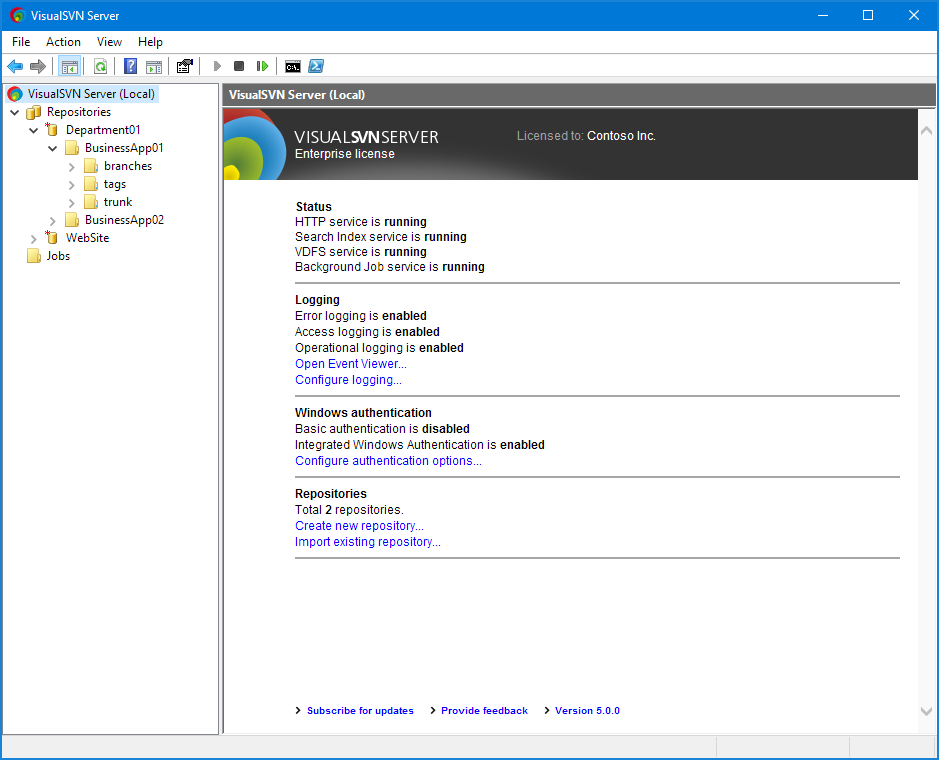
Features
Active Directory Single Sign-On
Allows users to access VisualSVN Server using their current Active Directory domain credentials. Secure Kerberos V5 or NTLM authentication protocols are used. Support for two-factor authentication and smart cards is available.
Multisite Repository Replication
Provides high-performance replication between geographically distributed sites using VisualSVN Distributed File System (VDFS) technology. Distributed repositories are writable and functionally equivalent to regular Subversion repositories.
Full-Text Search
Search through the contents and history of your repositories — in any folder, at any revision. The search engine offers high performance, continuous indexing of new revisions and has virtually no limits on the repository sizes.
Backup and Restore
The Backup and Restore feature was specifically designed for Subversion repositories and enables highly effective hot backup capabilities. In conjunction with scheduled repository verification, the Backup and Restore feature provides a reliable data protection from human errors and software or hardware failures.
HTML5-powered Web Interface
A rich web interface for Subversion repositories with modern look and feel. The Repository Web Interface is seamlessly integrated with all authentication and authorization features of VisualSVN Server. Ensures easy integration with issue trackers and other third-party applications.
PowerShell Scripting and Automation
VisualSVN Server includes a PowerShell module with a number of cmdlets to help administrators automate routine and repetitive tasks as well as simplify the server and repository deployment tasks.
Repository Management Delegation
Allows non-administrative users to manage repositories remotely using standalone application called VisualSVN Repository Configurator. All permission modifications performed by repository supervisors are logged for audit purposes.
Remote Server Administration
Allows to administer remote instances of VisualSVN Server. Because VisualSVN Server Manager is a standard MMC snap-in, you can create a single console to manage several VisualSVN Server instances across your network.
Access and Operational Logging
Allows you to monitor all HTTP requests and all logical Subversion operations processed by VisualSVN Server, including read-only operations such as Checkout and Update. Log entries are recorded to the Windows Event Log.
The license is perpetual (with 12 months of free upgrades), but you need to renew your license in order to have access to newer VisualSVN Server versions when the 12-months maintenance period ends.
Active maintenance gives you free access to all newer VisualSVN Server versions. When the maintenance period ends, updates to newer versions (including bug fix and security releases) become unavailable to you.
You are eligible to renew your maintenance with a 50% discount from the full license price. To qualify for the 50% discounted renewal pricing the maintenance must be renewed no later than 90 days after its expiration.
Maintenance renewals always commence from the expiration of your active maintenance period, regardless of when the maintenance renewal has been purchased. Therefore, it is convenient and recommended to renew your license before its expiration.
VisualSVN Server 5.2 is available under four different licenses:
- Essential license (paid). This license allows using all features of the Community license and adds additional features such as Full-Text Search, Scheduled Backup Jobs and Multisite Repository Replication (VDFS). The cost of the license depends on the maximum number of users and the VDFS repositories allowed by the license.
- Enterprise license (paid). This license allows using all features of the Essential license and adds enterprise-grade features such as Windows authentication (including Active Directory Single Sign-On), Repository Management Delegation and Remote Server Administration. The cost of the license depends on the maximum number of users and the VDFS repositories allowed by the license.
- Enterprise Multinode license (paid). This license comes with all Enterprise features, but with an unlimited number of distributed VDFS repositories and allows using a single license for all nodes of the VDFS cluster. For specific details please refer to KB158: Enterprise Multinode license overview article.
| Comparison Matrix | Community | Essential | Enterprise | Enterprise Multinode |
|---|---|---|---|---|
| Available for commercial use | ✓ | ✓ | ✓ | ✓ |
| Maximum FSFS repositories | Unlimited | Unlimited | Unlimited | Unlimited |
| Maximum users | 15 | 5–200 | 10–Unlimited | 50–Unlimited |
| Maximum VDFS repositories | — | 1–25 | 10–Unlimited | Unlimited |
| HTML5-powered Web Interface | ✓ | ✓ | ✓ | ✓ |
| PowerShell Scripting and Automation | ✓ | ✓ | ✓ | ✓ |
| Full-Text Search | — | ✓ | ✓ | ✓ |
| Backup Jobs | — | ✓ | ✓ | ✓ |
| Multisite Repository Replication | — | ✓ | ✓ | ✓ |
| Access and Operational Logging | — | ✓ | ✓ | ✓ |
| Password Guessing Attack Protection | — | ✓ | ✓ | ✓ |
| Windows Authentication | — | — | ✓ | ✓ |
| Active Directory Single Sign-On | — | — | ✓ | ✓ |
| Repository Management Delegation | — | — | ✓ | ✓ |
| Remote Server Administration | — | — | ✓ | ✓ |
L
Operating Systems
- Windows Server 2012 R2 – 2025
- Windows 8.1 or later
Minimum hardware
- 1.4 GHz CPU, 512 MB RAM
- 50 MB hard drive space
Compatibility
- Built against the latest Subversion 1.14 LTS release.
- Compatible with all Apache Subversion clients.
VisualSVN Server is distributed as a Windows Installer package (*.msi) file and comes with a setup wizard which will guide you through the basic steps to install the server. To begin the installation, you should download the VisualSVN Server installer package and launch it on the server computer.
VisualSVN Server comes in 64-bit and 32-bit versions. If you plan to install VisualSVN Server on Windows 64-bit, you should download and install a 64-bit version of VisualSVN Server.
[VisualSVN 견적 요청]

VisualSVN 한국 판매처 및
공인 리셀러
주식회사 크라이스아이앤씨는 2003년에 설립되어 VisualSVN Software Ltd.사의 VisualSVN 제품을 2009년도부터 판매해오고 있으며, 한국 공인 리셀러 입니다.
크라이스아이앤씨 는 국내 대표적인 IT 소프트웨어공급사로 한국 국내에 기업,학교,연구기관 및 공공기관등 여러 각종 전문분야에 종사하시는 분들에게 맞는 제품을 공급해드리고 있으며, 구매하신 소프트웨어제품의 업데이트와 필요시 업그레이드 지원을 하고 있습니다.
고객들이 해외소프트웨어구매시 어려움이 없게 크라이스아이앤씨 자체쇼핑몰 kreissoft.co.kr 를 운영해오고 있으며 또한 설계,디자인,영상,음악등 엔터테인먼트 분야에 특화된 쇼핑몰 Dez.co.kr 도 같이 운영하고 있습니다.
일반 고객들도 쉽고 편하게 이용할수 있도록 네이버 스마트스토어에 2018년도부터 입점하여 당사가 취급하는 전제품을 올려놓았으며 그동안 고객지원에 힘쓴결과 2022년 네이버파트너 인증을 받았습니다.