

NCSS 한국 판매처입니다.
크라이스아이앤씨는 NCSS 한국 공인 리셀러로서 국내 기업, 학교, 연구기관 및 개인 고객을 대상으로 NCSS, PASS 라이선스를 공급하고 있습니다. NCSS, PASS 라이선스 종류와 가격, 구매 방법에 대한 문의 및 견적 상담이 가능합니다. 다양한 소프트웨어 제품은 소프트웨어 제품 목록에서 확인하실 수 있습니다.
가격 및 구매 안내
| 제품명 | 가격(VAT포함) |
|---|---|
| NCSS 2026 1year Subscription: | 570,900원 |
| PASS 2026 1year Subscription: | 1,952,500원 |
| NCSS+PASS 1year Subscription: | 2,280,300원 |
| NCSS 2026 Perpetual: | 1,952,500원 |
| PASS 2026 Perpetual: | 8,163,100원 |
| NCSS+PASS Perpetual: | 9,144,300원 |
Data Analysis, Graphics
NCSS software provides a complete and easy-to-use collection of hundreds of statistical and graphics tools to analyze and visualize your data.
You can begin a free trial, watch the video to the right, or view the info-graphics below to learn more about the wide-ranging capabilities of NCSS.
NCSS software for data analysis comes complete with integrated documentation, free training videos, and full phone and email support from a team of PhD statisticians.
Discover the product that thousands of researchers, consultants, professionals, engineers, and scientists are using worldwide.
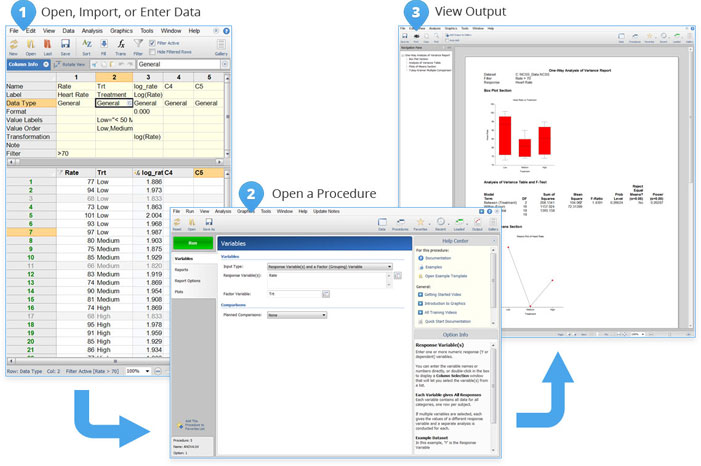
Analysis Using NCSS
With a few easy steps you can obtain meaningful numeric results and clean, clear graphics.
Use the Data window to import or enter your data. Open an NCSS procedure for your desired analysis. Select the columns and run the analysis to obtain accurate and easy-to-read numeric output and graphics.
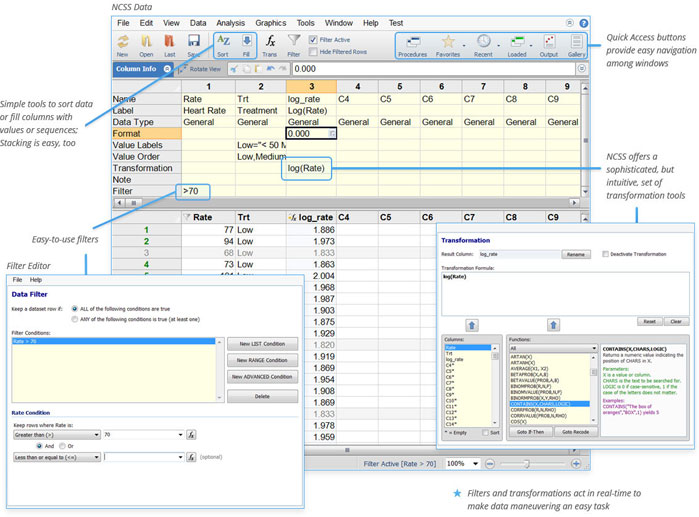
Intuitive Data Management
NCSS readily imports all major types of data files; or you can copy-and-paste your data, or enter your data directly. NCSS has excellent filtering and transformation features for managing your data.
- NCSS Data File (*.NCSS)
- Access Database
(*.ACCDB; *.MDB) - dBase File (*.DBF)
- Epi Info File (*.REC)
- Excel File (*.XLSX; *.XLS)
- Gauss File (*.DAT)
- JMP File (*.JMP)
- Matlab File (*.MAT)
- Minitab File (*.MTW)
- R File (*.RData)
- SAS File (*.SD2;*.SAS7BDAT…)
- SPLUS File (*.DAT)
- SPSS File (*.SAV; *.POR)
- Stata File (*.DTA)
- Statistica File (*.STA)
- Systat File (*.SYS; *.SYZ)
- Text File (*.TXT;*.PRN;*.CSV)
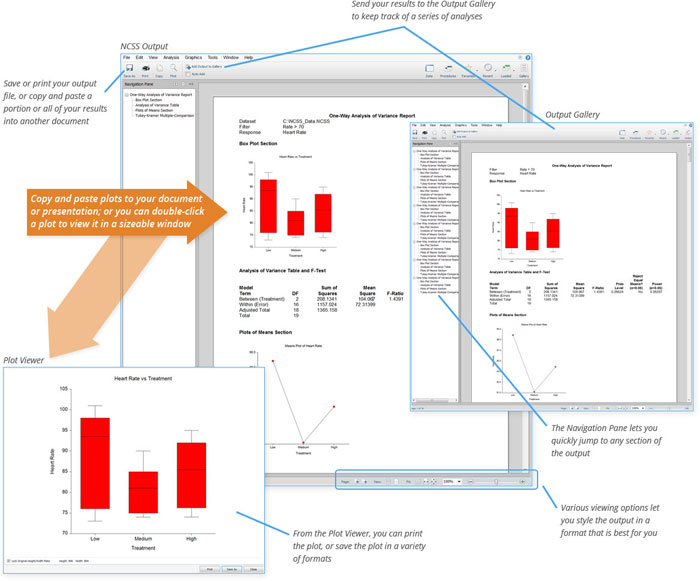
Ready to Use Output
When an NCSS procedure is run, the analysis results and the desired plots are displayed in the output window. All graphics can be clicked to be shown in a separate window for viewing or saving.
Navigation of the output is easy with the output navigation tree. The output and graphics are ready to be viewed, copied and pasted, or saved. Multiple output runs can be sent to the output gallery for saving or for comparing analyses.
To take a video tour of the output window in NCSS, click here.
Sample Size & Power
PASS software provides sample size tools for over 1200 statistical test and confidence interval scenarios – more than double the capability of any other sample size software. Each tool has been carefully validated with published articles and/or texts.
Get to know PASS by downloading a free trial, viewing the video to the right, or exploring this website.
PASS comes complete with integrated documentation and PhD statistician support.
PASS has been fine-tuned for over 25 years, and is now the leading sample size software choice for clinical trial, pharmaceutical, and other medical research. It has also become a mainstay in all other fields where sample size calculation or evaluation is needed.
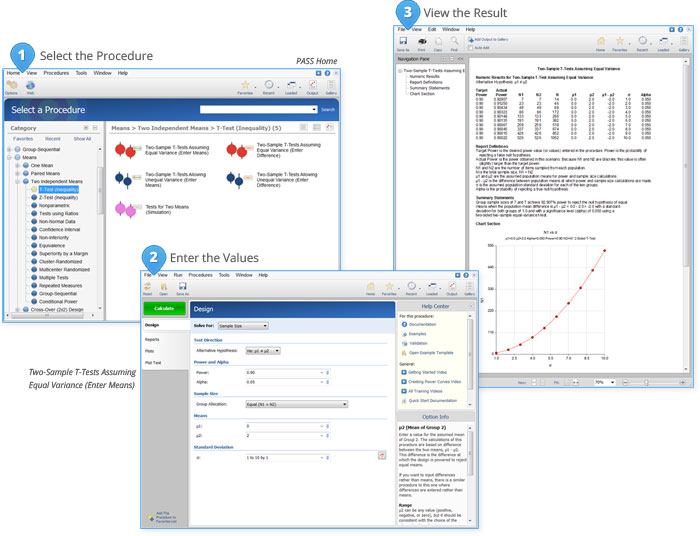
Obtaining A Sample Size In PASS
In PASS, you can estimate the sample size for a statistical test or confidence interval in a few short steps. If you need guidance during any of the steps, PASS has excellent documentation, there are free training videos, and you can contact our team of PhD statisticians.
Enter The Values
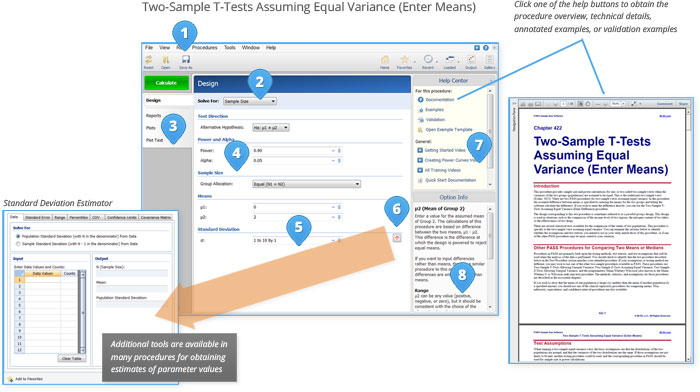
The sample size procedure tools are easy to use and have built-in help messages for every option.
Enlarge the infographic to see the descriptions of the ways that PASS helps you to enter the proper values in a sample size procedure tool. You can also watch this video to see an example of using a procedure window in PASS.
Ready to Use Output
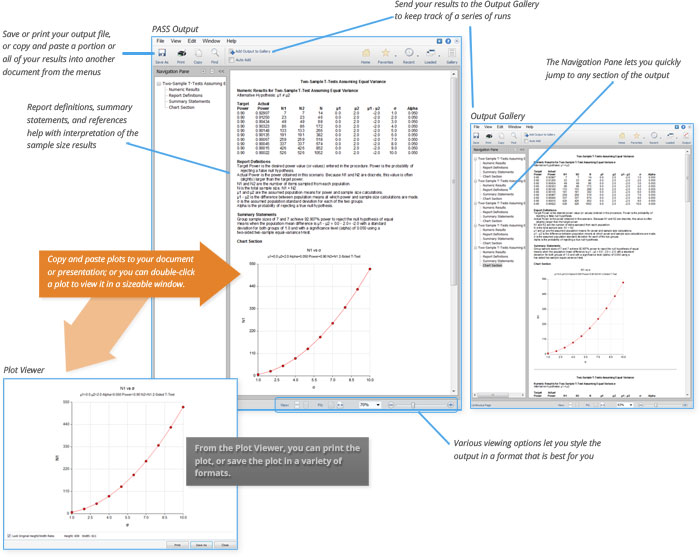
When a PASS procedure is run, the sample size results and corresponding plots are displayed in the output window. The sample size or power curves can be clicked to be shown in a separate window for viewing or saving.
Navigation of the output is easy with the output navigation tree. The format of the output makes it easy to be viewed, copied and pasted, or saved. Multiple output runs can be sent to the output gallery for saving or for comparing sample size analyses.
To take a video tour of the output window in PASS, click here.
Minimum System Requirements for NCSS 2026
In order to run NCSS 2026, your computer must meet the following minimum standards:
- Processor:
- 450 MHz or faster processor
- 32-bit (x86) or 64-bit (x64) processor
- RAM:
- 256 MB (512 MB recommended)
- Operating Systems:
- Windows 11 or later
- Windows 10
- Windows 8.1
- Windows 8
- Windows 7
- Windows Server 2022 or later
- Windows Server 2019
- Windows Server 2016
- Windows Server 2012 R2
- Windows Server 2012
- Windows Server 2008 R2 SP1
- Privileges:
- Administrative rights required during installation only
- Third Party Software:
- Microsoft .NET 4.8 (Comes pre-installed with Windows 11 or later, Windows 10 (May 2019 Update) or later, and Windows Server 2022 or later. Installation required on Windows 10 (October 2018 Update (Version 1809)) or earlier and Windows Server 2019 or earlier. For systems where .NET 4.8 installation is required, a .NET 4.8 download helper will start automatically when you run the NCSS setup file.)
- Microsoft Visual C++ 2015-2022 Redistributable (x86 for 32-bit NCSS or x64 for 64-bit NCSS) (For systems where Microsoft Visual C++ 2015-2022 Redistributable installation is required, a Microsoft Visual C++ 2015-2022 Redistributable installation helper will start automatically when you run the NCSS setup file.)
- Microsoft Windows Installer 3.1 or higher
- Adobe Reader® 7 or higher (required for the Help System only)
- Hard Disk Space:
- 400 MB for NCSS (plus space for Microsoft .NET 4.8 and Microsoft Visual C++ 2015-2022 Redistributable if not already installed)
- Printer:
- Any Windows-compatible inkjet or laser printer
NCSS 2026 on a Mac
A Windows emulator (such as Parallels) is required to run NCSS 2026 on a Mac.
Minimum System Requirements for PASS 2026
In order to run PASS 2026, your computer must meet the following minimum standards:
- Processor:
- 450 MHz or faster processor
- 32-bit (x86) or 64-bit (x64) processor
- RAM:
- 256 MB (512 MB recommended)
- Operating Systems:
- Windows 11 or later
- Windows 10
- Windows 8.1
- Windows 8
- Windows 7
- Windows Server 2022 or later
- Windows Server 2019
- Windows Server 2016
- Windows Server 2012 R2
- Windows Server 2012
- Windows Server 2008 R2 SP1
- Privileges:
- Administrative rights required during installation only
- Third Party Software:
- Microsoft .NET 4.8 (Comes pre-installed with Windows 11 or later, Windows 10 (May 2019 Update) or later, and Windows Server 2022 or later. Installation required on Windows 10 (October 2018 Update (Version 1809)) or earlier and Windows Server 2019 or earlier. For systems where .NET 4.8 installation is required, a .NET 4.8 download helper will start automatically when you run the PASS setup file.)
- Microsoft Visual C++ 2015-2022 Redistributable (x86) (For systems where Microsoft Visual C++ 2015-2022 Redistributable installation is required, a Microsoft Visual C++ 2015-2022 Redistributable installation helper will start automatically when you run the PASS setup file.)
- Microsoft Windows Installer 3.1 or higher
- Adobe Reader® 7 or higher (required for the Help System only)
- Microsoft .NET 4.8 (Comes pre-installed with Windows 11 or later, Windows 10 (May 2019 Update) or later, and Windows Server 2022 or later. Installation required on Windows 10 (October 2018 Update (Version 1809)) or earlier and Windows Server 2019 or earlier. For systems where .NET 4.8 installation is required, a .NET 4.8 download helper will start automatically when you run the PASS setup file.)
- Hard Disk Space:
- 500 MB for PASS (plus space for Microsoft .NET 4.8 and Microsoft Visual C++ 2015-2022 Redistributable if not already installed)
- Printer:
- Any Windows-compatible inkjet or laser printer
PASS 2026 on a Mac
A Windows emulator (such as Parallels) is required to run PASS 2026 on a Mac.
[NCSS, PASS 견적 요청]
NCSS 한국 판매처 및 공인 리셀러
주식회사 크라이스아이앤씨는 2003년에 설립되어 NCSS 사의 NCSS,PASS제품을 2010?년도부터 판매해오고 있으며, 한국 공인 리셀러 입니다.
크라이스아이앤씨 는 국내 대표적인 IT 소프트웨어공급사로 한국 국내에 기업,학교,연구기관 및 공공기관등 여러 각종 전문분야에 종사하시는 분들에게 맞는 제품을 공급해드리고 있으며, 구매하신 소프트웨어제품의 업데이트와 필요시 업그레이드 지원을 하고 있습니다.
고객들이 해외소프트웨어구매시 어려움이 없게 크라이스아이앤씨 자체쇼핑몰 kreissoft.co.kr 를 운영해오고 있으며 또한 설계,디자인,영상,음악등 엔터테인먼트 분야에 특화된 쇼핑몰 Dez.co.kr 도 같이 운영하고 있습니다.
일반 고객들도 쉽고 편하게 이용할수 있도록 네이버 스마트스토어에 2018년도부터 입점하여 당사가 취급하는 전제품을 올려놓았으며 그동안 고객지원에 힘쓴결과 2022년 네이버파트너 인증을 받았습니다.